
 By
ByAI video generation has gone from a novelty to a real part of creative workflows in 2026. And right now, two names dominate every conversation about it — Kling AI and Runway.
Both tools can turn a text prompt or a still image into a video clip in minutes. But they are very different products built for very different types of creators.
In this article I am going to break down Kling AI vs Runway across every important category video quality, speed, pricing, features, and which one is actually the right pick for you. I have pulled from weeks of real-world testing data and community feedback so you get an honest picture, not just a features list.
Let’s get into it.
Quick Overview: Kling AI vs Runway
Before diving into the details, here is the short version of how these two tools compare.
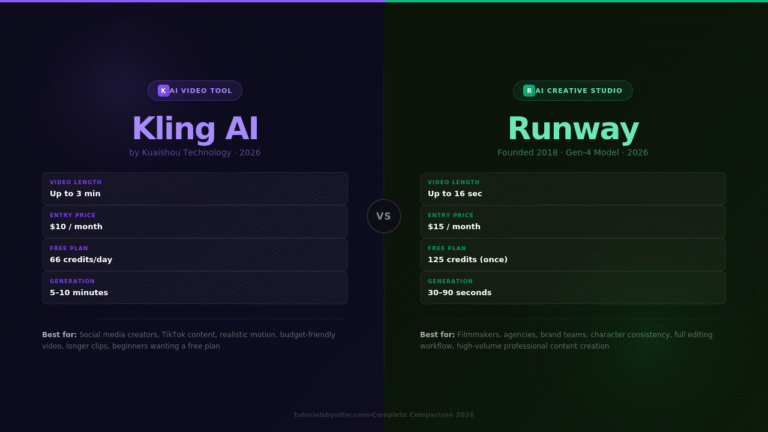
Kling AI is the better pick if you want the most realistic video output, longer video durations, a generous free plan, and lower monthly pricing. It is built for social media creators, content marketers, and anyone who wants cinematic-looking clips without spending a lot.
Runway is the better pick if you need a complete AI video production workflow, character consistency across multiple clips, professional editing tools, and fast generation speeds. It is built for filmmakers, agencies, brand teams, and professional content creators.
Many serious AI video creators actually use both — Kling for the motion and realism, Runway for the editing, consistency, and speed.
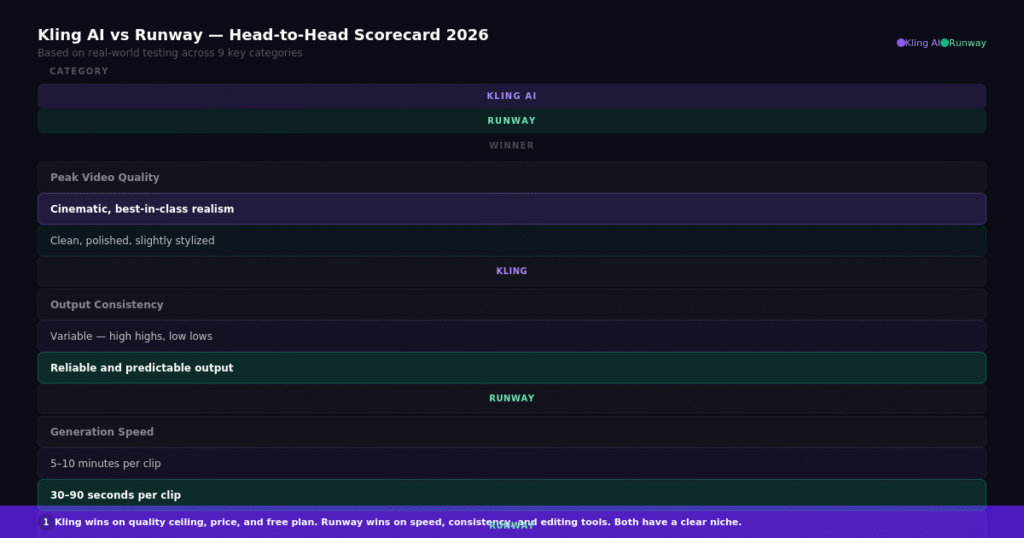
Quick comparison overview — Kling AI vs Runway side by side across all major categories.
What Is Kling AI?
Kling AI is an AI video generation platform built by Kuaishou Technology, a major Chinese tech company. It launched globally in 2024 and has quickly become one of the most popular AI video tools among content creators worldwide.
Kling is known for three things above everything else. First, it produces some of the most physically realistic AI video output available — water moves naturally, fabric ripples correctly, and human motion looks grounded. Second, it offers the longest video duration of any major AI tool, with clips extendable up to 3 minutes. Third, it is significantly cheaper than most competitors.
Kling generates videos using a credit system. The current model as of 2026 is Kling 2.6, which also added native audio generation — meaning the tool can now generate sound effects and ambient audio alongside the video.
What Is Runway?
Runway is an AI creative platform founded in 2018, making it one of the original players in AI video generation. It is used by professional filmmakers, advertising agencies, and video production teams worldwide, and has powered content for major commercial productions.
Unlike Kling, Runway is not just a video generator. It is a full AI creative studio with over 30 tools built into one platform — video generation, image creation, background removal, color grading, object erasing, motion capture, and more.
Runway’s current video model is Gen-4, which focuses heavily on character consistency. Where most AI video tools struggle to keep the same character looking the same across different scenes, Runway’s Gen-4 Reference system lets you upload multiple images to lock in a character’s appearance and maintain it across an entire video project.
Video Quality Comparison
This is the category most people care about first, and the answer is genuinely nuanced.
Kling AI produces the most realistic output when it works well. Its physics simulation is outstanding — nature scenes, portrait shots, and environment videos can be difficult to tell apart from real footage. The motion feels grounded and natural rather than smooth in an artificial AI way.
The catch is consistency. With Kling, you might generate five clips from the same prompt and get two that look cinematic, two that are decent, and one that falls apart entirely. When Kling is at its best, it beats everything. When it is not, the output can be unusable and you have still spent the credits.
Runway produces cleaner, more predictable output. It will not always match Kling’s ceiling quality, but its floor is significantly higher. You are much less likely to get a completely broken generation with Runway. For production work where you need reliable, consistent results, this matters a lot.
The general conclusion from extensive real-world testing is that Kling’s best output beats Runway’s best output, but Runway’s average output beats Kling’s average output.
Generation Speed
This is not a close comparison. Runway is dramatically faster.
Runway generates a 10-second clip in 30 to 90 seconds. Kling can take 5 to 10 minutes per generation in Professional mode. That is a 3x to 4x difference, and it adds up fast when you are iterating on prompts.
For rapid prototyping, social media content creation, or any workflow where you need to try multiple variations quickly, Runway’s speed is a meaningful advantage. Kling’s slower generation time does deliver better physics and motion quality, but waiting 8 minutes per clip gets frustrating fast.
Features Comparison
Both tools have unique features that the other does not offer.
Kling AI exclusive features:
The Motion Brush is one of the most useful features in AI video right now. It lets you select specific areas of your image and define exactly how they should move. You can keep the background completely static while animating just the subject, or make individual elements move in different directions. This level of control is not available in Runway.
Built-in Lip Sync lets you upload an audio file and Kling will animate the mouth movements of any character to match. This is essential for talking-head content, explainer videos, and any video where a character needs to speak.
The Elements feature lets you combine multiple images into a single video. You can upload a character from one image and a background from another, and Kling composites them with natural integration.
Native audio generation in Kling 2.6 means the tool can now generate ambient sound, environmental audio, and sound effects alongside the video. This saves a significant step in the production workflow.
Runway exclusive features:
Act-Two is Runway’s motion capture tool. You record yourself acting out a scene, and Runway maps your exact gestures, facial expressions, and body movements onto any AI character. Nothing in Kling’s toolkit matches this for expressive character animation.
Gen-4 References lets you upload multiple reference images to maintain character consistency across different scenes. This is the feature that makes Runway the choice for brand work and narrative projects where the same character appears in multiple clips.
The 30+ magic tools built into Runway cover everything from background removal and object erasing to color grading, slow motion conversion, and video-to-video style transformation. Runway is genuinely a full production environment.
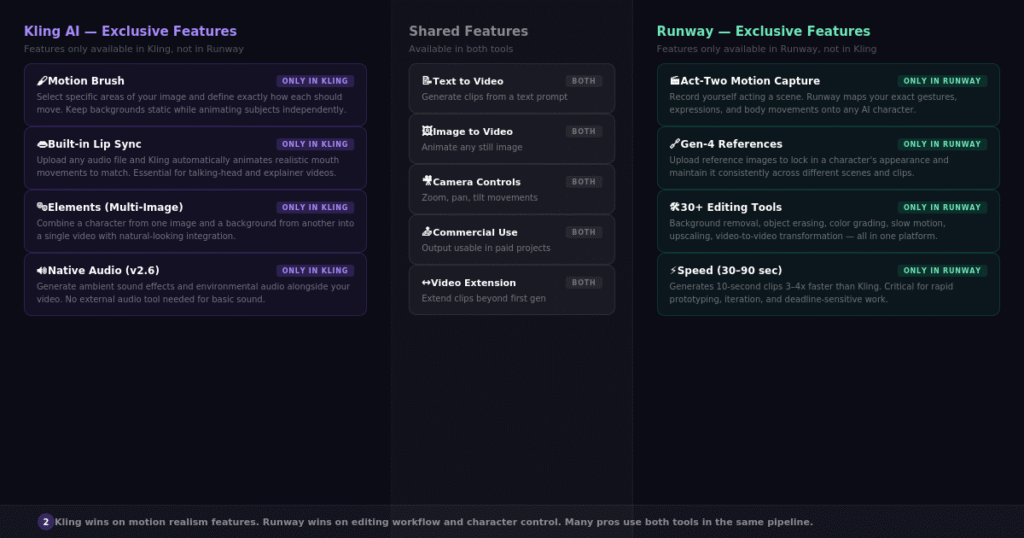
Feature comparison — what each tool offers exclusively and where they overlap.
Pricing Comparison
Kling AI is meaningfully cheaper than Runway at every comparable tier.
Kling AI pricing (2026):
- Free: 66 credits per day, refreshes daily, no credit card required
- Standard: $10/month — 660 credits, watermark-free
- Pro: $30/month — 3,000 credits, 1080p output
- Premier: $75/month — 8,000 credits, priority processing
Runway pricing (2026):
- Free: 125 one-time credits (not daily), watermarked
- Standard: $15/month — 625 credits
- Pro: $35/month — 2,250 credits
- Unlimited: $95/month — unlimited Explore Mode generations
The math works out like this. If you create under 30 videos per month, Kling is the better value by a significant margin. If you create 50 or more videos per month, Runway’s unlimited plan at $95/month actually becomes cheaper per video because you have no credit limits.
A few important warnings about Kling pricing. Failed generations still consume credits with no refund, and some users report failure rates of 30–40% during peak hours on the free tier. Paid credits in Kling also have an expiry period, so unused credits from your subscription can be lost if you do not use them.
Runway’s credit system is simpler and more predictable. Credits refresh monthly and the unlimited plan eliminates credit anxiety entirely for high-volume users.
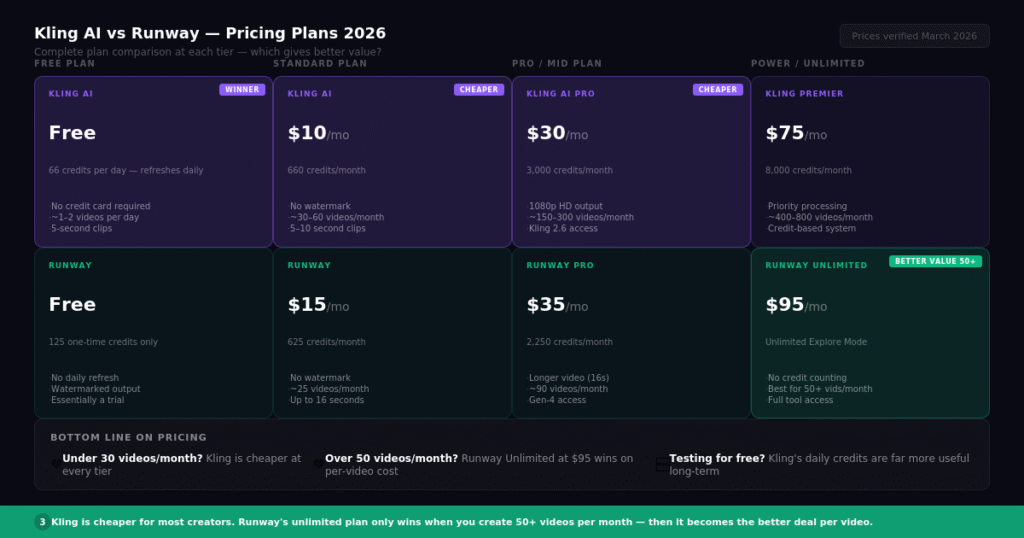
Pricing comparison chart — Kling AI vs Runway at each plan tier with per-video cost breakdown.
Free Plan Comparison
Kling AI has the better free plan, and it is not close.
Kling gives you 66 credits every single day, which refreshes automatically without a credit card. This is enough to generate approximately 1 to 2 standard-quality videos per day. Over a month, that adds up to a genuinely useful amount of content.
Runway gives you 125 credits as a one-time trial. Once those are gone, you are on a paid plan. The one-time nature makes Runway’s free tier essentially a demo rather than a free tier you can use long-term.
For anyone who wants to test AI video generation before committing any money, Kling AI’s free plan is the clear recommendation.
Who Should Use Kling AI?
Kling AI is the right choice in these situations.
You are a social media creator or content marketer who needs realistic-looking video clips for TikTok, Instagram Reels, or YouTube Shorts. Kling’s physics and motion quality make short social clips look genuinely impressive.
You are budget-conscious and need to get results without spending $35 to $95 per month. Kling’s Standard plan at $10/month is the most affordable entry point among serious AI video tools.
You need longer videos. If your project requires clips longer than 30 seconds, Kling is your only real option among the top tools. Runway caps at around 16 seconds per clip.
You want to test AI video without a credit card. Kling’s daily free credits make it accessible without any financial commitment.
Who Should Use Runway?
Runway is the right choice in these situations.
You are a professional filmmaker, agency creative, or brand team that needs reliable, consistent output for client work. Runway’s predictability and character consistency features make it the safer professional choice.
You need a full production workflow in one platform. Runway’s 30+ tools cover the entire creative pipeline from generation to editing to export. You can generate, refine, color grade, and export without leaving the platform.
You create 50 or more videos per month. At that volume, Runway’s unlimited plan becomes the most cost-effective option on a per-video basis.
Speed matters for your workflow. If you are testing multiple prompt variations quickly or working on deadline, Runway’s 30–90 second generation time versus Kling’s 5–10 minutes makes a real difference.
You need character consistency across a project. If the same character needs to appear in multiple scenes, Runway’s Gen-4 References feature is the only tool that handles this reliably.
Can You Use Both Together?
Yes — and many professional AI video creators already do.
The most common professional workflow in 2026 is to use Runway’s Gen-4 References to generate consistent character images, then export those into Kling to animate them with Kling’s superior motion physics. You get character consistency from Runway and realistic motion from Kling.
This hybrid approach takes more time and uses credits from two platforms, but the quality ceiling it unlocks is higher than either tool can achieve on its own.
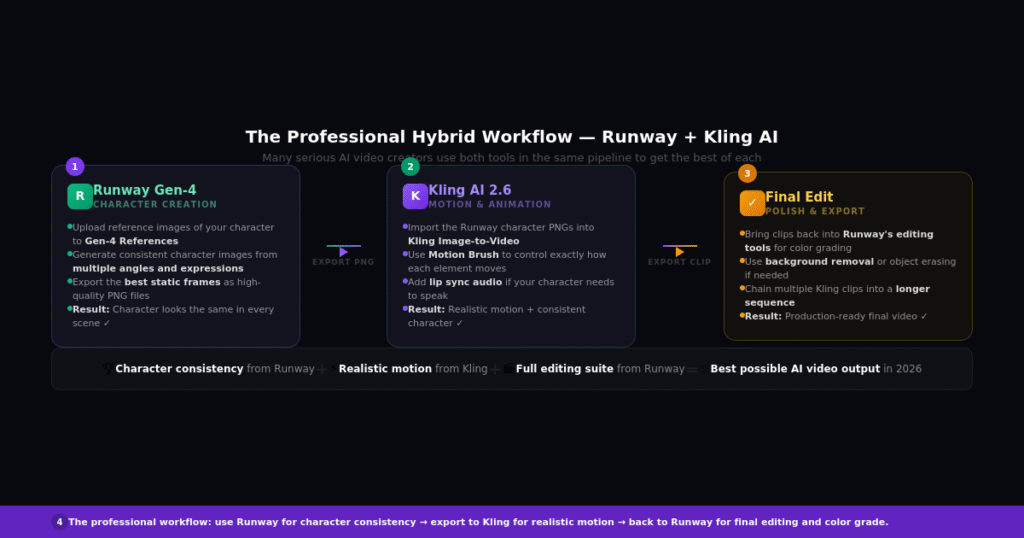
The professional hybrid workflow — using Runway for character consistency and Kling for realistic motion.
Which is better for beginners — Kling AI or Runway?
Kling AI is more beginner-friendly. The interface is cleaner, the free plan is genuinely useful, and you can start generating videos without any technical knowledge or a credit card. Runway has a steeper learning curve because of its broader toolset.
Does Kling AI produce better quality video than Runway?
Kling’s peak output quality is higher, especially for realistic scenes with natural physics. But Runway’s average output is more consistent and less likely to produce completely broken generations. For casual creators, Kling’s quality ceiling is more exciting. For professional work, Runway’s consistency is more valuable.
Is Runway worth the higher price?
For professional use, yes. The 30+ integrated tools, Gen-4 character consistency, Act-Two motion capture, and reliable output justify the price for agencies, filmmakers, and brand teams. For casual creators or social media content, Kling delivers more value per dollar.
Can I use Kling AI for commercial projects?
Yes, but there are important considerations. Kling is built by a Chinese company (Kuaishou Technology), which raises data privacy questions for some enterprise and government clients. Runway is US-based with clearer data handling policies. For most commercial creative work, both are usable. For sensitive enterprise projects, Runway is the safer choice.
Which tool is faster?
Runway is significantly faster. It generates 10-second clips in 30 to 90 seconds. Kling can take 5 to 10 minutes per generation in Professional mode.
Which AI video tool is best for Instagram Reels and TikTok?
Kling AI is the better choice for short social media content. Its realistic motion, affordable pricing, and daily free credits make it ideal for creators who need a steady stream of visually impressive short clips.
What is the maximum video length in Kling vs Runway?
Kling allows extensions up to 3 minutes by chaining clips together. Runway caps at around 16 seconds per clip. For any content requiring longer video, Kling is the only viable option between the two.
Subscribe for Newsletter

