
 By
ByChatGPT has changed how graphic designers work. In 2026, it is not just a writing tool anymore. With image generation built in through GPT-Image-1.5, ChatGPT can now help you brainstorm concepts, write creative briefs, generate logo ideas, create social media visuals, and produce client-ready mockups in minutes.
But here is the truth most people do not tell you — the results you get depend entirely on how you write the prompt. A vague prompt gets you a generic image. A well-structured prompt gets you something you can actually use.
In this guide, I am sharing exactly how to write ChatGPT prompts for graphic design, including the formula that works every time, plus 50+ copy-paste ready prompts across every major design category. I have also included the most trending prompts that are going viral on social media right now in 2026.
Let’s get started.
What Can ChatGPT Actually Do for Graphic Designers?
Before getting into the prompts, it helps to understand what ChatGPT is actually good at in a design workflow — and where it falls short.
What ChatGPT does well:
It generates images from text descriptions using GPT-Image-1.5. You describe what you want and it produces a visual in seconds. The quality in 2026 is genuinely impressive for concept work, social media visuals, and mood board images.
It acts as a creative brief machine. Describe your project, client, and goals, and ChatGPT will give you multiple design directions, color palette suggestions, typography recommendations, and layout ideas — instantly.
It helps you think through design problems. Stuck on a logo concept? ChatGPT can generate 10 different conceptual directions in 30 seconds, any of which might spark the idea that leads to your final design.
It writes copy for your designs. Taglines, CTAs, headlines, product descriptions — all generated in the right tone and length for any design brief.
Where it falls short:
It does not produce final print-ready files. The output is always a raster image, not a vector. You need to take the concept into Illustrator, Photoshop, or Canva to produce the actual deliverable.
Text rendering inside images is improving but still inconsistent. If precise text in an image is critical, generate the layout concept with placeholder text and add the real text yourself.
It is a starting point, not a finishing tool. The best way to use ChatGPT in design is as an accelerator for the ideation and concept phase, not as a replacement for actual design execution.
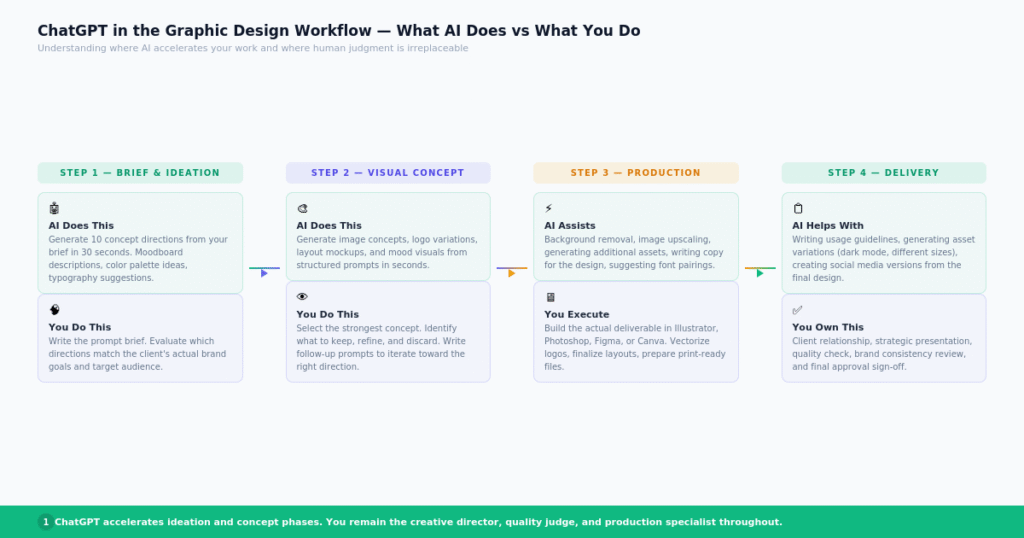
ChatGPT in the graphic design workflow — where AI assists and where human judgment takes over.
The Prompt Formula That Gets Real Results
The biggest mistake most people make with ChatGPT design prompts is being too vague. “Make me a logo” produces generic garbage. Structured prompts produce usable results.
The formula that consistently works for graphic design prompts is:
Subject + Style + Colors + Composition + Mood/Reference + Format
Here is what each element means:
Subject — What is in the image? Be specific. Not “a logo” but “a minimalist icon of a mountain peak.”
Style — What visual style should it match? Flat design, 3D render, watercolor, line art, geometric, photorealistic, vintage, Bauhaus, Art Deco, and so on.
Colors — Name specific colors or describe the palette. “Warm brown and cream” is better than “natural colors.” Hex codes work if you need exact brand colors.
Composition — How should elements be arranged? Centered, asymmetric, circular, grid, full bleed, minimal white space?
Mood or Reference — What feeling should the image communicate? “Clean and corporate,” “playful and bold,” “luxury and refined,” “gritty and urban.”
Format — What is this for? Instagram post (1:1), YouTube thumbnail (16:9), logo (square), poster (A4 portrait)?
A weak prompt: “Design a coffee shop logo.”
A strong prompt using the formula: “Design a minimalist logo for a specialty coffee brand. Single coffee bean icon in thin line style, circular frame. Warm brown (#7B4F2E) and cream (#F5E6D3) color palette. Clean white background. Modern, sophisticated mood. Flat vector style, suitable for both digital and print use.”
The difference in output quality is dramatic.
How to Write Strong ChatGPT Prompts for Graphic Design
Beyond the formula, here are a few techniques that consistently improve results.
Be specific about what you do not want. ChatGPT responds well to negative instructions. Add phrases like “no gradients,” “no shadows,” “no complex backgrounds,” “no text overlaid on the image,” “no stock photo look.”
Reference design styles by name. Instead of saying “modern,” say “Swiss International Style,” “Dieter Rams minimalism,” “Memphis Design,” “Bauhaus geometric,” or “Japanese wabi-sabi aesthetic.” These references tap into ChatGPT’s training data and produce much more targeted results.
Iterate with follow-up prompts. Your first generation is rarely your last. Treat ChatGPT like a junior designer on the first round. Use follow-up prompts like “Make it darker and more minimal,” “Add more negative space,” “Change the icon to a leaf instead of a circle,” or “Regenerate in a completely different style.”
Include the end use. Saying “this will be used as a LinkedIn profile banner at 1584×396 pixels” helps ChatGPT understand what constraints apply to the composition and text size.
Use role-setting. Start prompts with “Act as a senior brand designer” or “You are a creative director briefing a design team.” This framing often improves the quality and specificity of the output significantly.
50+ ChatGPT Prompts for Graphic Design (By Category)
Logo Design Prompts
These prompts are for logo ideation and concept generation. The output gives you visual directions to refine in Illustrator.
1. Tech Startup Logo “Design a minimalist logo for a SaaS startup called NexaFlow. Clean geometric shapes, electric blue (#2979FF) and white. Simple icon representing data flow or connection. Modern, trustworthy, scalable. Flat vector style, white background. No gradients.”
2. Coffee Brand Logo “Create 3 different logo concepts for a specialty coffee roastery called Roast & River. Explore icons inspired by rivers, coffee beans, and flow. Warm brown and muted blue palette. Strong monochrome version also required. Vector flat style.”
3. Wellness Brand Logo “Design a logo for a yoga and wellness studio called Serene. Lotus flower icon, soft gold (#C9A84C) and sage green (#8FAF8F) palette. Elegant, minimal, feminine. Clean white background, serif typography style. Suitable for print and digital.”
4. Photography Studio Logo “Create a minimal wordmark logo for a photography studio called Frame & Light. Camera aperture icon integrated with the lettermark F. Monochrome black and white only. Grid-based, precise, geometric. Suitable for watermarks.”
5. Food Brand Logo “Design a logo for a healthy snack brand targeting young adults. Bold, playful, colorful. Icon of a rising sun over a grain field. Warm yellow (#FFB800) and deep green (#1B5E20). Rounded sans-serif typography. Fun but credible.”
6. Architecture Firm Logo “Design a logo for a modern architecture and interior design studio. Abstract architectural form using only rectangles and lines. Charcoal (#2C2C2C) and warm gold (#C9A84C). Minimal, structured, premium. No icons — pure geometric abstraction.”
7. Gaming Brand Logo “Create a logo for an esports team called Storm Circuit. Lightning bolt icon merged with a circuit board pattern. Electric purple (#7B00FF) and neon green (#00FF88) on black. Dynamic, bold, aggressive energy. Flat digital style.”
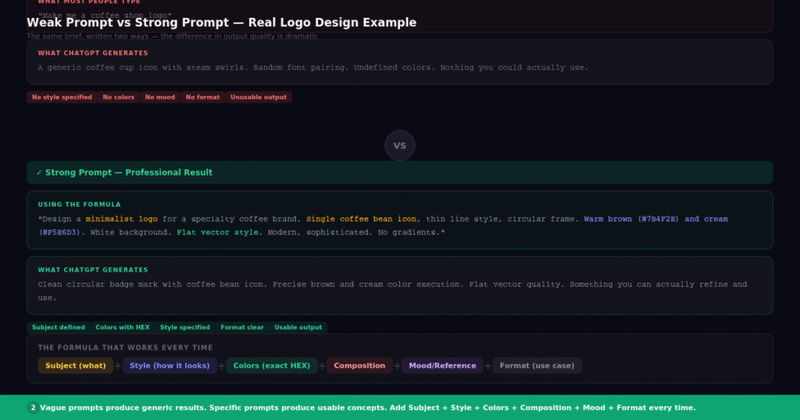
Examples showing how the same brief with a weak vs strong prompt produces completely different logo concept quality.
Brand Identity Prompts
These prompts help you develop broader brand systems, not just logos.
8. Color Palette for Luxury Brand “Suggest a complete color palette for a luxury men’s grooming brand targeting 30–45 year old professionals. Include 5 colors with hex codes: one dominant, two supporting, one accent, one neutral. Describe the psychology and use case for each color.”
9. Moodboard Direction “Create a moodboard direction for a sustainable fashion brand targeting Gen Z. Describe: 3 visual references, color palette (with hex codes), typography style, photographic aesthetic, and the 3 words that capture the brand’s visual identity.”
10. Brand Voice and Visual Identity “Act as a brand strategist. For a fintech startup serving first-generation college students, describe the visual identity: logo style, color palette, typography pairing, illustration style, and photography direction. Include what NOT to do visually.”
11. Competitor Logo Analysis “Act as a senior brand designer. Analyze the logo design language used by premium coffee brands (think Blue Bottle, Intelligentsia, Stumptown). Identify patterns in color, typography, iconography, and whitespace. How can a new brand differentiate visually?”
12. Typography Pairing Recommendation “Recommend 3 Google Fonts pairings for a modern legal services firm. For each pairing, provide: heading font, body font, why they work together, and how to use them (sizing, weight, spacing). Professional, trustworthy, modern feel.”
Social Media Design Prompts
13. Instagram Post — Product Launch “Design a square Instagram post (1080x1080px) announcing the launch of an AI writing tool called Scribeflow. Bold headline: ‘Write 10x Faster.’ Blue and white color scheme. Minimal layout. Clear CTA ‘Try Free Today.’ Clean, modern, high contrast.”
14. Instagram Story — Motivational Quote “Create an Instagram Story graphic (1080x1920px) for a fitness brand. Quote: ‘Your only competition is yesterday’s version of you.’ Background: deep charcoal with subtle texture. Gold typography. Logo in top corner. Minimal, premium feel.”
15. LinkedIn Banner “Design a LinkedIn profile banner (1584x396px) for a UX designer. Shows abstract design process: wireframes, color palettes, and typography elements. Dark navy background, white and electric blue accents. Professional, creative, clean.”
16. YouTube Thumbnail — Tutorial “Create a YouTube thumbnail for a Photoshop tutorial titled ‘Remove Background in 10 Seconds.’ Left side: before photo with cluttered background. Right side: clean result. Red arrow between them. Bold white text with dark drop shadow. High contrast, clickable.”
17. Pinterest Graphic — Design Tips “Design a tall Pinterest graphic (1000x1500px) titled ‘7 Design Rules Every Creator Should Know.’ Clean editorial layout. Sans-serif typography. Sage green and white palette. Numbered list with icon for each rule. Blog-style aesthetic.”
18. Twitter/X Announcement Post “Create a landscape Twitter graphic (1200x675px) announcing a new product update. Brand colors blue (#1DA1F2) and white. Headline: ‘Introducing Dark Mode.’ Simple icon illustration. Clean, minimal, news-style layout.”
Poster and Print Design Prompts
19. Event Poster “Design a music festival poster for an electronic music event called Pulse. Taking place in Mumbai, March 2026. Neon purple, electric blue, and black color scheme. Abstract geometric shapes with motion blur effects. Bold display typography. Portrait format A3.”
20. Corporate Conference Poster “Create a professional conference poster for a design summit. Clean grid layout, geometric patterns, sans-serif typography. Navy blue and warm gold color palette. Event name large at top, speaker slots below, date and venue at bottom. A4 portrait.”
21. Book Cover Design Concept “Design a book cover concept for a non-fiction book titled ‘The Quiet Mind’ about mindfulness for busy professionals. Minimal illustration of a person meditating, surrounded by soft geometric shapes. Muted blue and white palette. Simple, contemplative.”
22. Restaurant Menu Concept “Design a one-page restaurant menu for a modern Indian fine dining restaurant. Rich burgundy (#6D1D2B) and gold (#C9A84C) palette. Clean grid layout with clear sections. Decorative botanical border elements. Refined, upscale, warm atmosphere.”
23. Product Packaging Concept “Design a packaging concept for a premium artisanal chocolate brand. Kraft paper texture with metallic gold foil text. Minimal, handcrafted feel. Logo centered on front. Bar grid on back. Earthy, sustainable, luxury aesthetic.”
UI and Web Design Prompts
24. App UI Mockup “Design a mobile app UI screen for a meditation app. Dark navy background with soft glowing elements. Circular breathing animation guide in center. Bottom navigation with 5 minimal icons. Card-style content sections. Clean, calming, modern.”
25. Website Hero Section “Design a website hero section for a SaaS productivity tool. Split layout: left 55% has headline ‘Do More in Less Time,’ supporting text, and blue CTA button. Right 45% shows app screenshot in floating device mockup. Clean white background with subtle blue gradient.”
26. Dashboard UI Design “Create a dashboard UI design for an analytics platform. Dark mode, sidebar navigation on left. Main area has 4 metric cards at top, a line chart below, and a data table at bottom. Dark slate background, electric blue and green accent colors. Clean, data-forward.”
Product Mockup Prompts
27. T-Shirt Mockup “Create a product mockup of a white t-shirt with a minimalist black mountain logo printed on the chest. Flat lay on light grey textured surface. Soft natural lighting from top left. Clean editorial photography style. 1:1 ratio for Shopify.”
28. Business Card Mockup “Show a premium business card mockup with matte dark navy card and gold foil logo. Two cards: one face up showing front design, one face down showing clean back. Marble surface background. Luxury, minimal, professional.”
29. Phone Case Mockup “Design a product mockup of a clear iPhone case with a minimalist botanical illustration. Displayed on a light beige linen background with dried flowers as props. Soft natural light. Aesthetic, Instagram-ready composition.”
Color Palette Prompts
30. Brand Color Palette “Create a brand color palette for a sustainable tech startup targeting environmentally-conscious millennials. Provide 5 hex codes: 1 primary, 2 secondary, 1 accent, 1 neutral background. Include color name, hex code, and use case for each.”
31. Seasonal Palette “Suggest a color palette for a winter wellness brand launching seasonal packaging. Inspired by Nordic winter — snow, pine, frozen lake, warm firelight. 6 colors with hex codes. Describe the mood each color creates.”
32. Dark Mode UI Palette “Create a dark mode color system for a professional design tool app. Include: background (3 levels of dark), surface color, primary accent, secondary accent, text color (3 weights), error, warning, and success states. All with hex codes.”
Typography Prompts
33. Font Pairing for Fashion Brand “Recommend a Google Fonts pairing for a luxury sustainable fashion brand. One display font for headlines, one sans-serif for body text. Describe size ratios, weight usage, and letter-spacing recommendations. Show example heading + body text sample.”
34. Custom Typography Brief “Write a typography brief for a bespoke typeface for a heritage Indian cuisine restaurant. The font should feel rooted in Indian calligraphic tradition but work cleanly in digital contexts. Describe letterform characteristics, weight options, and language support needed.”
35. Typography Hierarchy System “Design a complete typography hierarchy for a tech magazine. Define: display (H1), heading (H2-H3), subheading (H4), body text, captions, labels, and CTA buttons. Include font name, size (px), weight, line height, and letter spacing for each level.”
Trending ChatGPT Design Prompts in 2026
These are the prompt styles that are going viral right now. If you want to create content that gets engagement, these are the ones to try.
1. Action Figure / Toy Box Trend (Viral — Feb 2026)
This exploded on social media when people discovered they could turn their photos into collectible toy packaging.
“Use this photo to create a stylized action figure of me in a plastic blister pack, designed like a premium collectible toy. The figure should have recognizable facial features and a friendly expression. The blister pack should have a bold header with ‘[Your Name or Title]’ in large text. Include 3–4 small accessories related to my profession displayed beside the figure. Vivid colors, clean product design, white background.”
2. AI Caricature Trend (Viral — Feb/Mar 2026)
The caricature trend briefly crashed OpenAI’s servers when it went viral. Designers and professionals are using it for profile pictures and social content.
“Create a professional caricature of a graphic designer. Oversized stylus in hand, color palettes floating around, Pantone color chips in pocket. Artistic studio background with design sketches on the wall. Exaggerated but recognizable creative expression. Bold, vibrant colors. Pixar-style 3D cartoon rendering.”
3. Cinematic Night Portrait (High Engagement on Instagram)
“Create a cinematic portrait with dramatic rain and neon city lights at night. Subject stands calmly in foreground, neon reflections in puddles below. Text ‘IN THE NIGHT’ visible in neon signage behind subject. Film still quality, moody atmosphere, shallow depth of field, 35mm lens look. 4:5 ratio for Instagram.”
4. Vintage Packaging / Retro Label Design
“Design a vintage-style product label for artisanal hot sauce in 1950s American diner aesthetic. Hand-lettered script font, red and yellow color scheme, illustrated rooster mascot. Aged paper texture, distressed printing effects. Authentic retro feel, not ironic.”
5. Ghibli-Style Illustration Trend (Still Going Strong)
“Create a Studio Ghibli-style illustration of a cozy home office workspace at golden hour. Soft warm light through a window, plants on the desk, a cat sleeping on the chair, books stacked beside the monitor. Painterly style, soft watercolor-like colors, peaceful and nostalgic mood.”
6. Dark Aesthetic Social Media Template
“Design a dark aesthetic Instagram post template for a personal brand. Deep black background (#0A0A0A) with subtle grain texture. Serif headline typography in off-white (#F5F5F0). Single decorative horizontal line divider. Minimal, editorial, luxury fashion magazine feel.”
7. Brutalist Web Design Inspiration
“Generate a brutalist website design concept for a creative agency. Heavy black borders, newspaper grid, stark black and white with one bright red accent (#FF0000). Bold condensed typography. Deliberately raw and unpolished — antidesign aesthetic.”
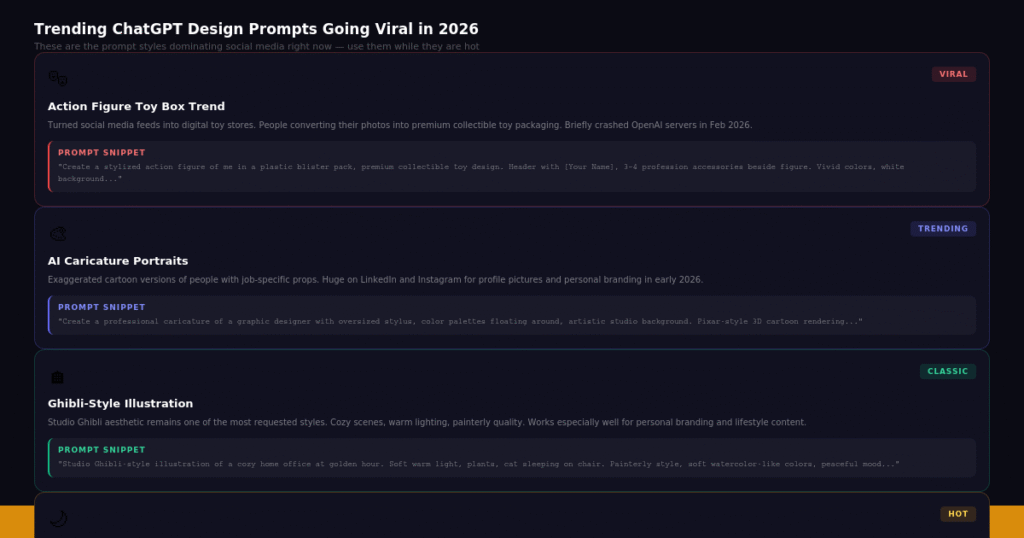
Trending ChatGPT design prompt styles in 2026 — from the action figure trend to cinematic portraits.
Tips to Get Better Results from ChatGPT Design Prompts
Generate multiple variations. Ask ChatGPT to “generate 4 different variations of this concept” in a single prompt. Seeing multiple options helps you identify which direction has potential faster.
Use the image-to-image feature. Upload an existing design or reference image to ChatGPT and ask it to “generate a new design in a similar style but for [your brief].” This is much faster than describing a visual style from scratch.
Be specific about what is not working. If a generation is 80% right, say specifically what needs to change: “Everything is good but the composition is too centered — make it more asymmetric and give more breathing room on the right side.”
Save your best prompts. When a prompt produces a great result, save it in a document. Build a personal library of prompts that work for your most common design briefs. This becomes a massive time-saver over time.
Combine ChatGPT with other tools. Use ChatGPT for concept generation, then take the best result into Adobe Firefly for vectorization, Canva for templating, or Figma for UI refinement. ChatGPT works best as part of a workflow, not as a standalone design tool.
Test the same prompt across tools. The same prompt often produces different results in ChatGPT, Midjourney, and Adobe Firefly. Testing your best prompts across platforms gives you more options to choose from.
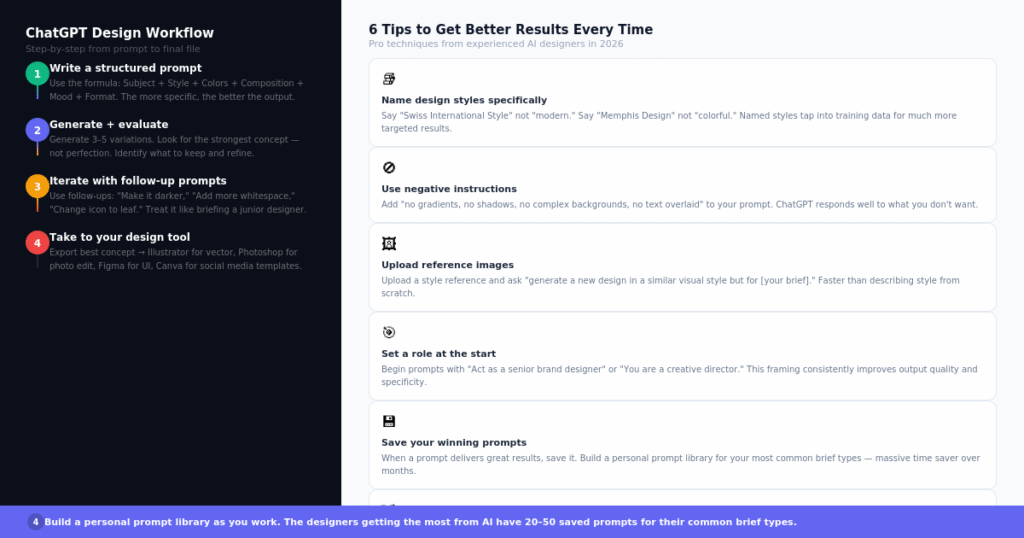
The ChatGPT design workflow — from prompt writing to concept refinement to final production in your design tool.
Final Thoughts
ChatGPT prompts for graphic design are genuinely useful in 2026. They speed up the ideation phase, help you break through creative blocks, give you directions to explore with clients, and produce visual concepts that used to take hours to sketch out manually.
The key is treating ChatGPT like a powerful junior designer — not a design director. It generates raw material. You provide the creative judgment, the strategic thinking, and the final execution.
Use the prompts in this article as a starting point. Customize them for your specific projects, clients, and style. And as you find prompts that work well for you, build your own library.
The designers who get the most out of AI tools are not the ones who use every feature — they are the ones who have mastered a handful of prompts that consistently deliver results for their specific type of work.
Subscribe for Newsletter

