
 By
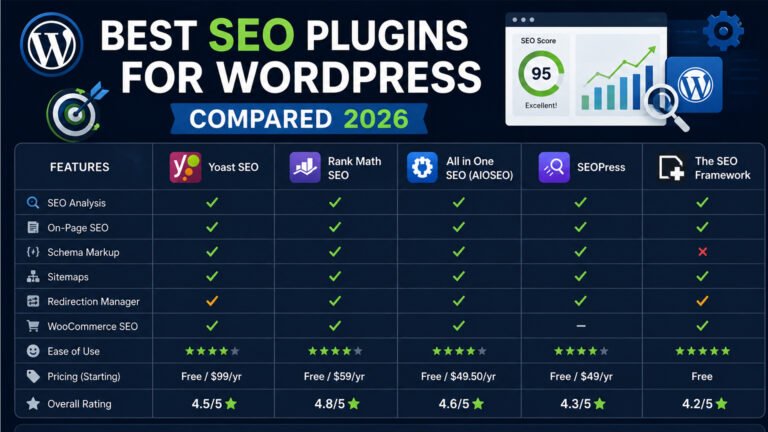
ByOptimizing your WordPress site for search engines is crucial to attract more visitors and improve your online presence. With numerous SEO plugins available, choosing the right one can be challenging. This article compares the top SEO plugins for WordPress in 2026, helping you make an informed decision.
Yoast SEO: The Industry Standard
Yoast SEO has been a leading choice for WordPress users since its inception in 2007. It offers a comprehensive suite of tools to enhance your site’s SEO.
Key Features
- Content and Readability Analysis: Provides real-time feedback on your content’s SEO and readability.
- XML Sitemaps: Automatically generates sitemaps to help search engines index your site.
- Breadcrumbs Control: Enhances site navigation and user experience.
- Canonical URLs: Prevents duplicate content issues by setting canonical URLs.
Pros and Cons
- Pros: User-friendly interface, extensive documentation, and a strong community support.
- Cons: Some advanced features are locked behind the premium version, which costs $99 per year.
Yoast SEO is ideal for beginners and content-focused bloggers seeking a reliable and straightforward SEO solution.
Rank Math: Feature-Rich and User-Friendly
Rank Math has gained popularity for its extensive features and intuitive design, making it a strong contender in the SEO plugin market.
Key Features
- Multiple Focus Keywords: Optimize posts for multiple keywords simultaneously.
- Advanced Schema Markup: Supports various schema types to enhance rich snippets.
- Google Search Console Integration: Access search performance data directly from your dashboard.
- 404 Monitor and Redirection Manager: Identify and fix broken links efficiently.
Pros and Cons
- Pros: Generous free version with features often found in premium plugins, modular design for better performance.
- Cons: The abundance of features may overwhelm beginners.
Rank Math is suitable for users seeking a comprehensive SEO tool without additional costs.
All in One SEO (AIOSEO): Comprehensive and Beginner-Friendly
AIOSEO offers a balanced approach to SEO, combining powerful features with ease of use.
Key Features
- Smart XML Sitemaps: Automatically updates sitemaps and notifies search engines of changes.
- TruSEO Score: Provides actionable insights to improve on-page SEO.
- Local SEO Support: Enhances visibility for local businesses.
- WooCommerce SEO: Optimizes e-commerce sites for better search rankings.
Pros and Cons
- Pros: Intuitive setup wizard, excellent for beginners, and robust support for various SEO aspects.
- Cons: Some advanced features require the Pro version, starting at $49.50 per year.
AIOSEO is perfect for small business owners and beginners looking for a user-friendly SEO solution.
SEOPress: White-Label and Developer-Friendly
SEOPress is a versatile plugin offering a clean interface and extensive features, appealing to developers and agencies.
Key Features
- White-Labeling: Customize the plugin’s branding to match your own.
- Content Analysis: Offers insights similar to Yoast’s traffic light system.
- Google Analytics Integration: Monitor site performance directly from your dashboard.
- Breadcrumbs and Schema Markup: Enhance site navigation and search appearance.
Pros and Cons
- Pros: No ads or upsells, unlimited keywords in the free version, and affordable premium options.
- Cons: May lack some advanced features found in other plugins.
SEOPress is ideal for agencies and developers seeking a customizable and ad-free SEO plugin.
Choosing the Right SEO Plugin for Your Needs
Selecting the best SEO plugin depends on your specific requirements and experience level:
- For Beginners: Yoast SEO and AIOSEO offer user-friendly interfaces and comprehensive guidance.
- For Advanced Users: Rank Math provides extensive features suitable for those with more SEO experience.
- For Developers and Agencies: SEOPress offers white-label capabilities and customization options.
Evaluate your site’s needs and choose a plugin that aligns with your goals and expertise.
FAQs
1. Can I use multiple SEO plugins simultaneously?
It’s not recommended to use multiple SEO plugins at the same time, as they may conflict and cause issues. Choose one that best fits your needs.
2. Are free versions of SEO plugins sufficient?
Free versions of plugins like Rank Math and Yoast SEO offer substantial features suitable for most users. Evaluate if the free version meets your requirements before considering a premium upgrade.
3. How do SEO plugins improve my site’s ranking?
SEO plugins assist in optimizing on-page elements, generating sitemaps, managing redirects, and providing insights to enhance your site’s visibility to search engines.
4. Is technical knowledge required to use these plugins?
No, plugins like Yoast SEO and AIOSEO are designed with beginners in mind, offering intuitive interfaces and guidance.
5. How often should I update my SEO plugin?
Regularly update your SEO plugin to ensure compatibility with the latest WordPress version and to access new features and improvements.
Choosing the right SEO plugin is essential for enhancing your WordPress site’s visibility and performance. Assess your specific needs and select a plugin that offers the features and support suitable for your experience level and website goals.
Subscribe for Newsletter

