
 By
ByIf you are starting an online store in 2026, one question comes up before almost everything else — WooCommerce or Shopify?
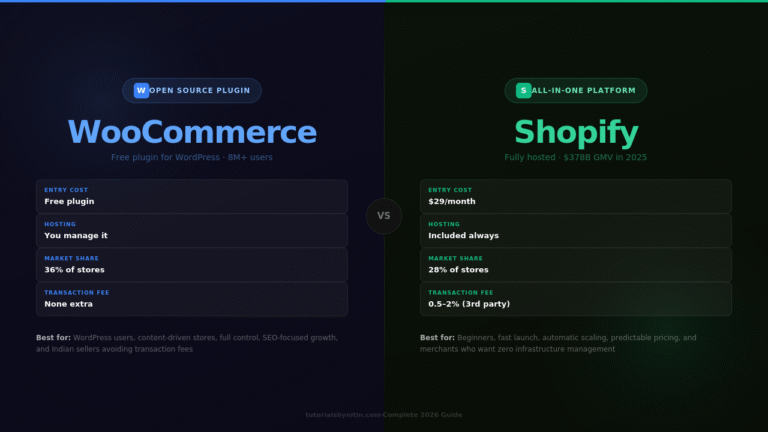
Both platforms power millions of stores worldwide. WooCommerce currently powers around 36% of all eCommerce websites globally, while Shopify controls 28% of market share. Neither is universally better. They are built on different philosophies and serve different types of store owners.
This guide breaks down WooCommerce vs Shopify across every important category — pricing, ease of use, SEO, design, scalability, and support — so you can make a clear, confident decision without wasting time on the wrong platform.
WooCommerce vs Shopify: Quick Overview
Before getting into the details, here is the short version.
WooCommerce is a free, open-source eCommerce plugin for WordPress. It gives you complete control over every part of your store — design, code, hosting, data, and features. That freedom is powerful, but it also means more responsibility. You handle your own hosting, security, updates, and technical maintenance.
Shopify is a fully hosted, all-in-one eCommerce platform. Everything — hosting, security, updates, SSL, and CDN — is bundled into your monthly subscription. You focus on selling. Shopify handles the infrastructure.
The simplest way to think about it: WooCommerce gives you more control, Shopify gives you more convenience.
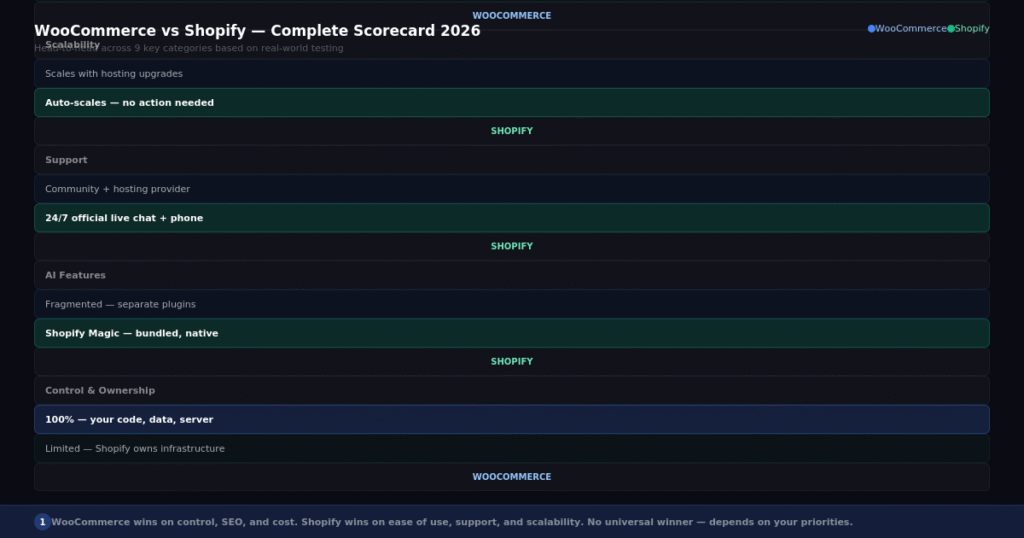
WooCommerce vs Shopify at a glance — a quick head-to-head across the most important categories.
What Is WooCommerce?
WooCommerce is an eCommerce plugin built for WordPress, launched in 2011. It transforms any WordPress website into a fully functional online store. Because it runs on WordPress — which itself powers over 40% of all websites on the internet — WooCommerce has access to the largest ecosystem of themes, plugins, and developers in the world.
The core WooCommerce plugin is free to download and install. You will need to pay for hosting, a domain name, and potentially some premium plugins or extensions depending on what features your store needs. But the core platform itself costs nothing.
WooCommerce is open-source, which means the code is publicly available and you can modify it freely. Developers can build entirely custom functionality, integrate with any third-party system, and take the store in any direction technically.
As of 2026, WooCommerce has over 8 million active users and powers a significant portion of the world’s online stores, from small freelancer shops to large enterprise-level eCommerce businesses.
What Is Shopify?
Shopify is a fully hosted, subscription-based eCommerce platform founded in 2006. Unlike WooCommerce, Shopify is not a plugin — it is a standalone platform purpose-built for selling online.
When you sign up for Shopify, everything you need is included in your plan. Hosting, security, SSL certificate, CDN, mobile optimization, and software updates all happen automatically in the background. You log in and manage your store from a clean, unified dashboard without worrying about the technical side.
In 2025, Shopify processed $378 billion in gross merchandise value — more than triple what it processed in 2020 — and crossed $11.5 billion in annual revenue for the first time. It is the infrastructure of choice for serious commercial operations.
Shopify also has a significant edge in AI-powered commerce features. Shopify Magic, the platform’s suite of AI tools, covers product description writing, email content, customer insights, and analytics — all bundled into every plan without additional cost.
Pricing Comparison
This is where WooCommerce vs Shopify gets genuinely complicated, because the pricing models work completely differently.
WooCommerce pricing:
The WooCommerce plugin itself is free. But running a WooCommerce store involves separate costs that add up quickly. You will need to pay for hosting ($10–$50/month for managed WordPress hosting), a domain name ($10–$15/year), and depending on your needs, premium plugins for things like advanced shipping rules, subscriptions, membership systems, and multi-currency support.
A typical small WooCommerce store costs around $30–$100/month total when you factor in hosting and a few necessary plugins. As your store grows, hosting costs increase to handle more traffic.
The significant advantage of WooCommerce is that you only pay for what you actually need. If you do not need subscription billing, you do not pay for it. If you host your store on basic shared hosting, you pay very little.
Shopify pricing:
Shopify uses subscription plans. The Basic plan starts at $29/month (annual billing) or $39/month (monthly billing). The standard Shopify plan is $105/month and the Advanced plan is $399/month.
Everything is bundled into these prices — hosting, SSL, security, CDN, and software updates. There are no separate hosting bills.
The hidden cost to watch out for is transaction fees. If you use a payment gateway other than Shopify Payments (such as PayPal or Razorpay), Shopify charges an additional fee of 0.5% to 2% on every sale depending on your plan. For high-volume stores using third-party payment processors, these transaction fees can add up to a significant monthly cost.
Which is cheaper?
For stores just starting out, WooCommerce is almost always cheaper. For high-volume stores doing 50+ orders per day, Shopify’s predictable all-in pricing often becomes more cost-efficient when you factor in the hosting upgrades and developer time that WooCommerce requires at scale.
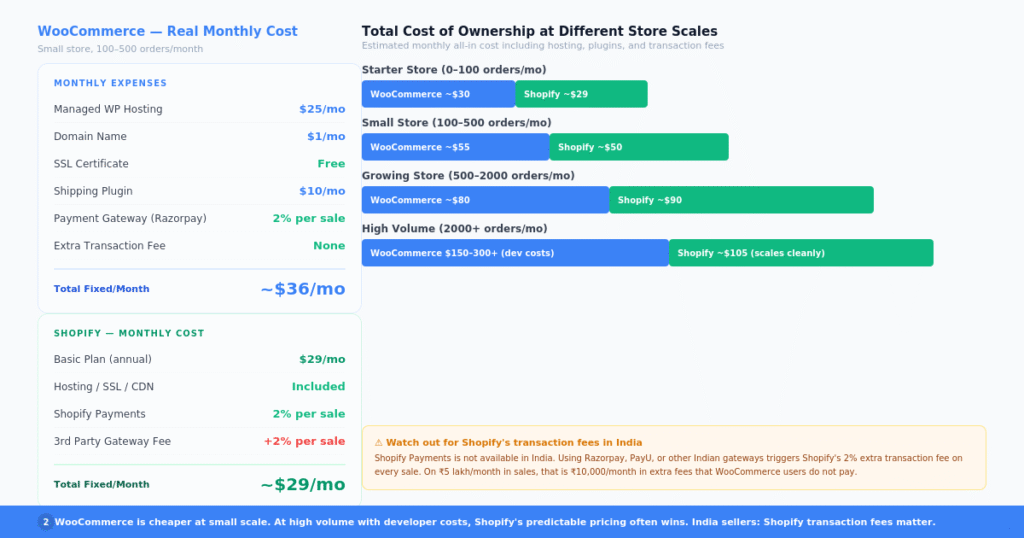
WooCommerce vs Shopify pricing breakdown — actual costs at each stage of store growth.
Ease of Use
This is not a close comparison. Shopify wins on ease of use by a significant margin.
When you sign up for Shopify, you are guided through a clean setup process. You choose a theme, add your products, connect a payment gateway, and your store is live — often within a few hours. The dashboard is clean, logical, and purpose-built for merchants. Everything you need is where you expect it to be.
WooCommerce requires more steps before you even start building your store. You need to purchase hosting, install WordPress, install the WooCommerce plugin, configure settings, find and install additional plugins for features you need, and set up payment gateways independently. This is manageable, but it takes more time and some comfort with WordPress.
For someone who has never built a website before, Shopify is significantly more accessible. For someone already comfortable with WordPress, WooCommerce feels natural.
Design and Themes
Both platforms offer a wide range of design options, but they work very differently.
Shopify has around 200 themes in its official theme store. Roughly a dozen are free. Premium themes start at around $150 to $350 as a one-time purchase. The themes are polished, mobile-optimized, and designed specifically for eCommerce conversion. Customization happens through Shopify’s visual theme editor, which is clean and user-friendly. For deeper changes, Shopify uses its own templating language called Liquid, which requires a developer if you want to go beyond the visual editor.
WooCommerce has access to the entire WordPress theme ecosystem — thousands of free themes and hundreds of premium ones across every price point. If you use a page builder like Elementor, you can design virtually any layout you can imagine. The flexibility is dramatically higher than Shopify. The tradeoff is that not every WordPress theme is optimized for eCommerce, so you need to choose carefully.
For designers and developers who want complete creative control, WooCommerce’s design flexibility is a major advantage. For business owners who want a polished store quickly without needing a designer, Shopify’s curated theme library is easier to work with.
SEO Capabilities
SEO is one area where WooCommerce holds a clear advantage — and it matters a lot for organic traffic growth.
WooCommerce runs on WordPress, which is the most SEO-friendly CMS ever built. You have complete control over your URL structure, metadata, schema markup, page speed optimization, and content strategy. With a plugin like Rank Math or Yoast SEO, you can optimize every product page, category page, and blog post to a degree that Shopify simply does not allow.
The ability to build a full content marketing strategy alongside your store is one of WooCommerce’s strongest long-term advantages. If you want to rank for product-related keywords by publishing guides, comparisons, and informational content, WordPress gives you the infrastructure to do that well.
Shopify has improved its SEO capabilities significantly over the years, and it handles the basics well. But it still has limitations — URL structures are less flexible, certain technical SEO settings cannot be changed without developer customization, and the blog is less powerful than WordPress’s native publishing tools.
For stores where content marketing and organic traffic are a central growth strategy, WooCommerce is the better platform. For stores focused primarily on paid advertising and social selling, Shopify’s SEO limitations matter less.
Scalability
Both platforms can handle large stores, but they scale in very different ways.
Shopify scales automatically. When your store gets more traffic — during a product launch, a Black Friday sale, or a viral moment — Shopify’s infrastructure handles the load without you doing anything. The platform processed $378 billion in GMV in 2025, so it is battle-tested at extraordinary scale. You do not need to upgrade your hosting or worry about server capacity.
WooCommerce scales with your hosting. If your store grows significantly, you will need to upgrade to better hosting — managed cloud hosting, a dedicated server, or enterprise-level infrastructure. This gives you more control over performance optimization, but it also means more management responsibility and increasing hosting costs as you grow.
For most small to medium-sized stores, WooCommerce on good managed hosting handles traffic perfectly well. For stores expecting rapid growth or high-traffic peaks, Shopify’s managed scalability removes a significant operational burden.
Payment Options and Transaction Fees
WooCommerce supports virtually every payment gateway available. PayPal, Stripe, Razorpay, PayU, CCAvenue — there is a plugin for everything. And because WooCommerce does not charge transaction fees of its own, you only pay the standard gateway processing fees (typically 2–3% per transaction). This is a significant financial advantage for high-volume stores.
Shopify works with over 100 payment providers through its app store. Its native option is Shopify Payments, which has competitive rates and no additional Shopify fees. However, if you use any other payment gateway, Shopify charges an extra 0.5% to 2% on every transaction in addition to the gateway’s own fees. For stores in countries where Shopify Payments is not available — including many parts of India and Southeast Asia — this transaction fee becomes a real ongoing cost.
For sellers in markets where Shopify Payments is not available, WooCommerce has a clear pricing advantage on payment processing.
Apps, Plugins, and Integrations
WooCommerce has access to the entire WordPress plugin repository — over 59,000 plugins covering everything you can imagine. The quality varies enormously. The best plugins are excellent, well-maintained, and deeply integrated. The worst can create security vulnerabilities and conflicts. Choosing good plugins requires some research.
Shopify has a curated App Store with over 8,000 apps. The curation means lower quality variance — most apps in the Shopify App Store are properly vetted and maintained. But the smaller selection means occasionally you will not find a native app for something very specific and will need a custom solution.
For most common eCommerce needs, both ecosystems have strong solutions. WooCommerce wins on raw availability. Shopify wins on consistent quality control.
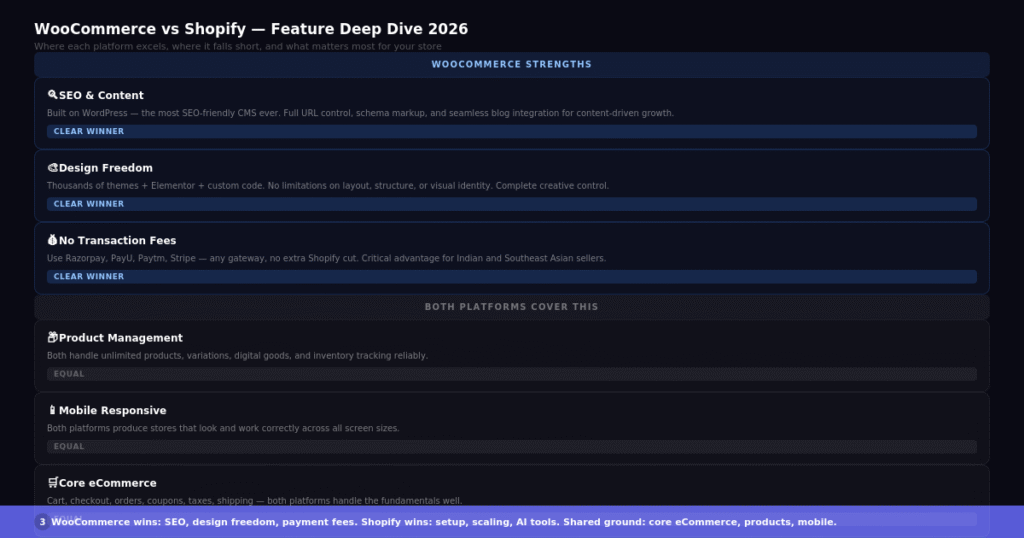
Side-by-side feature comparison — WooCommerce vs Shopify across 10 key categories.
Customer Support
Shopify provides 24/7 support through live chat, phone, and email. The support team is dedicated to Shopify specifically and can help with most store management issues. For merchants on higher plans, priority support is available.
WooCommerce does not have a single official support channel in the same way. The official WooCommerce website has documentation, tutorials, and a community forum. Your hosting provider often fills the support gap — a good managed WordPress hosting company will provide 24/7 support that covers WooCommerce issues. Developers in the WordPress community are widely available if you need custom help.
For beginners who want reliable, consistent support without having to find a developer, Shopify’s integrated support is a meaningful advantage.
Who Should Use WooCommerce?
WooCommerce is the better choice in these situations.
You already use WordPress and want to add a store to an existing site. WooCommerce integrates directly with your existing content and SEO setup without any migration needed.
You want full control over your store’s code, design, and data. WooCommerce gives you ownership of everything — your database, your files, your customer data.
Content marketing and SEO are a central part of your growth strategy. The WordPress + WooCommerce combination is the most powerful content-commerce platform available.
You are in a market where Shopify Payments is not available and want to avoid transaction fees on third-party gateways.
You have a developer on your team or access to one, and you want maximum technical flexibility.
You are selling in a niche with very specific requirements — custom product configurators, unusual shipping logic, complex membership systems — where WooCommerce’s open-source flexibility is the only way to build what you need.
Who Should Use Shopify?
Shopify is the better choice in these situations.
You are launching your first online store and want to be live quickly without dealing with technical setup. Shopify lets you focus on products and selling from day one.
You want predictable, all-inclusive pricing without separate hosting bills, security worries, or plugin conflicts.
Your store expects rapid growth or high-traffic events. Shopify’s infrastructure scales automatically without you managing server upgrades.
You are running a product-first business where content marketing is not a primary growth channel and you want a platform optimized for conversion.
Your team is small and non-technical. Shopify’s merchant dashboard is built for business people, not developers.
You want built-in AI tools for product descriptions, email content, and analytics without paying for third-party services separately.
[IMAGE 4: article_img4_woo_shopify.png] Decision guide — which platform to pick based on your store size, technical level, and business goals.
Final Thoughts
The WooCommerce vs Shopify debate does not have a universal winner. Both are excellent platforms that power successful businesses at every scale.
Choose WooCommerce if you value control, flexibility, content marketing, and cost ownership — and you are comfortable with WordPress or have developer support.
Choose Shopify if you value simplicity, speed to launch, built-in scalability, and predictable all-inclusive pricing — and you want to focus on selling rather than managing infrastructure.
Either platform can support a profitable, growing online store. The decision comes down to how you prefer to work and what matters most to your specific business.
If you are still unsure, start with a free trial on Shopify and a free WooCommerce install on your WordPress site. Testing both firsthand for a few days will tell you more than any comparison article.
Subscribe for Newsletter

