

 By
ByIntroduction: The Modern Developer’s Design Dilemma
In today’s fast-paced web development landscape, creating stunning user interfaces while maintaining clean, efficent CSS code can feel like an overwhelming challenge. Developers often find themselves juggling multiple tasks—writing complex CSS properties, testing visual effects, optimizing code, and ensuring cross-browser compatibility. The traditional workflow involves switching between numerous applications, websites, and code editors, which inevitably slows down productivity and disrupts creative flow.
Enter KineTools—a comprehensive collection of 20+ free online utilities specifically designed to streamline the CSS and UI design process for developers. Whether you’re crafting beautiful color gradients, generating glassmorphism effects, or creating perfect box shadows, KineTools CSS UI design tools help you work faster and smarter without the hassle of installations, sign-ups, or complicated configurations.
This article explores how KineTools simplifies CSS and UI design for developers, examining its powerful features, real-world applications, and the transformative impact it can have on your development workflow. By the end of this comprehensive guide, you’ll understand why thousands of developers have made KineTools their go-to platform for rapid UI development.

What Makes KineTools Different from Other CSS Tools?
The web is saturated with design tools and CSS generators, but KineTools CSS UI design platform stands out for several compelling reasons that directly address the pain points modern developers face daily.
Browser-Based Instant Access
Unlike traditional design software that requires downloads, installations, and updates, KineTools operates entirely within your browser. This means you can access every tool from any device—desktop, tablet, or mobile—without compromising functionality. The moment you visit the platform, you’re ready to create. There’s no setup time, no configuration hassles, and absolutely no learning curve for getting started.
Privacy-First Local Processing
One of the most significant advantages of KineTools is its commitment to user privacy. All tools run locally in your browser, ensuring that your code, designs, and creative work never leave your device. Unlike cloud-based services that upload your files to remote servers for processing, KineTools handles everything client-side. This approach gives you complete privacy and security—a critical consideration for developers working on confidential projects or proprietary designs.
Real-Time Visual Feedback
When working with CSS, the traditional workflow involves writing code, saving the file, refreshing the browser, and evaluating the result. This cycle repeats dozens of times per component. KineTools eliminates this tedious process entirely. Every tool provides instant visual previews that update in real-time as you adjust parameters. Move a slider, see the result immediately. Change a color, watch it update instantly. This immediate feedback loop accelerates design decisions and helps developers achieve pixel-perfect results in a fraction of the time.
Production-Ready Code Export
Creating visual effects is only half the challenge—implementing them in your project is where many tools fall short. KineTools CSS UI design generators produce clean, well-commented, production-ready code that you can copy and paste directly into your projects. The exported code includes proper browser prefixes, follows modern CSS best practices, and requires no editing or cleanup. This seamless integration saves countless hours that would otherwise be spent manually formatting and optimizing generated code.
Zero Learning Curve
Complex design tools often require extensive tutorials and documentation before you can use them effectively. KineTools takes the opposite approach. Each tool features an intuitive interface that anyone can use—from beginners to expert developers. Visual controls, clear labels, and logical organization mean you can start creating immediately without reading documentation or watching tutorial videos.
Comprehensive Tool Suite: 20+ Utilities for Every Design Need
KineTools isn’t just a single tool—it’s a complete ecosystem of utilities covering virtually every aspect of CSS and UI design. Let’s explore the most powerful tools and how they solve specific development challenges.
CSS Gradient Generator: Create Stunning Color Transitions
Gradients add visual depth and interest to web designs without requiring image assets. The KineTools Gradient Generator supports linear, radial, and conic gradients with unlimited color stops, giving developers complete creative freedom.

Key Features:
- Visual color picker for precise color selection
- Multiple gradient types (linear, radial, conic)
- Unlimited color stops with adjustable positions
- Angle and direction controls
- Real-time preview with instant updates
- Export options for CSS, SCSS, and Tailwind formats
Real-World Application: When designing a modern hero section for a SaaS landing page, developers can create sophisticated multi-stop gradients in seconds that would take 30+ minutes to code manually. The visual interface eliminates guesswork and allows for rapid experimentation with different color combinations.
Glassmorphism Generator: Modern Frosted Glass Effects
Glassmorphism has become one of the most popular design trends in modern UI development. The KineTools Glassmorphism Generator makes creating these sophisticated frosted-glass effects incredibly simple.
Key Features:
- Adjustable backdrop blur intensity (2px to 30px+)
- Precise transparency and opacity controls
- Border customization with gradient support
- Professional preset library
- Shadow layering capabilities
- Export-ready CSS with browser prefixes
Time Savings: What traditionally takes 30-60 minutes of CSS tweaking now takes 30-60 seconds with KineTools. That’s a 60x time savings on every glass component you create. Over a typical project with 10 glassmorphism elements, developers save approximately 9.5 hours of development time.
CSS Box Shadow Generator: Perfect Depth Effects
Box shadows create visual hierarchy and depth in UI designs. The KineTools Shadow Generator allows developers to craft perfect shadows through visual controls rather than cryptic CSS values.
Key Features:
- Multiple shadow layers for complex depth effects
- Horizontal and vertical offset controls
- Blur radius and spread adjustment
- Color picker with opacity support
- Inset shadow options
- Real-time preview on different backgrounds
Developer Benefit: Instead of writing box-shadow: 0 4px 6px rgba(0, 0, 0, 0.1) from memory and hoping it looks right, developers can visually dial in the exact shadow effect they need and instantly see the result.

CSS Background Pattern Generator: Geometric Designs Without Images
Background patterns play a crucial role in establishing visual interest and brand identity. The KineTools Pattern Generator offers 15+ geometric pattern styles created with pure CSS—no image files required.
Pattern Options:
- Dots, stripes, grids, zigzags
- Diamonds, hexagons, waves
- Customizable size, opacity, rotation
- Pattern and background color controls
- Export in CSS, SCSS, inline styles, or Tailwind format
Performance Advantage: CSS-based patterns are infinitely scalable, reduce HTTP requests, and don’t increase page load times like image-based patterns do. This results in faster loading websites with better performance metrics.
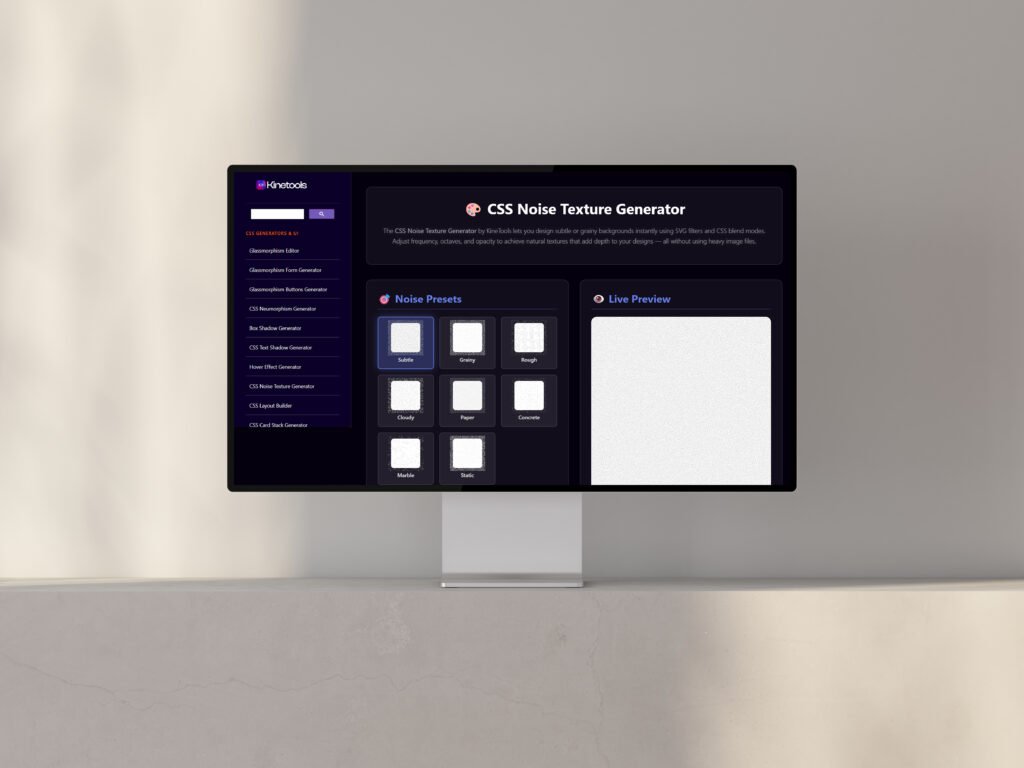
CSS Noise Texture Generator: Realistic Grainy Effects
The Noise Texture Generator uses SVG filters and pure CSS to create realistic grain effects that add texture and depth to UI elements without external images.
Applications:
- Film grain effects for photography portfolios
- Subtle texture on glassmorphism interfaces
- Vintage aesthetic elements
- Background depth enhancement
Technical Implementation: The generator produces SVG filter code combined with CSS blend modes, creating professional-quality noise textures that run at smooth 60fps performance across modern browsers.
CSS-Only Image Tilt Effect: Interactive 3D Motion
The Image Tilt Generator creates organic, reactive motion effects where images dynamically tilt in response to cursor movement—entirely with CSS, no JavaScript required.
Unique Features:
- Pure CSS-powered (cleaner, lighter, faster than JS solutions)
- Adjustable tilt intensity and perspective
- Customizable animation speed and easing
- Natural 3D-like motion that feels organic
- Responsive and works on hover-enabled devices
Use Cases: Portfolio showcases, product photography displays, interactive card grids, and SaaS application interfaces benefit immensely from these subtle yet engaging micro-interactions.

Custom Cursor Generator: Unique Mouse Pointers
Stand out with custom cursors that match your brand. The KineTools Cursor Generator offers 48 ready-made designs with full customization options.
Customization Options:
- Size, color, and stroke width adjustments
- Animated cursor support
- SVG or CSS data URI export
- 48 professional presets
- Real-time preview on different backgrounds
Implementation: Developers can export cursors as SVG files or inline data URIs, making implementation as simple as adding a single CSS rule to their stylesheet.
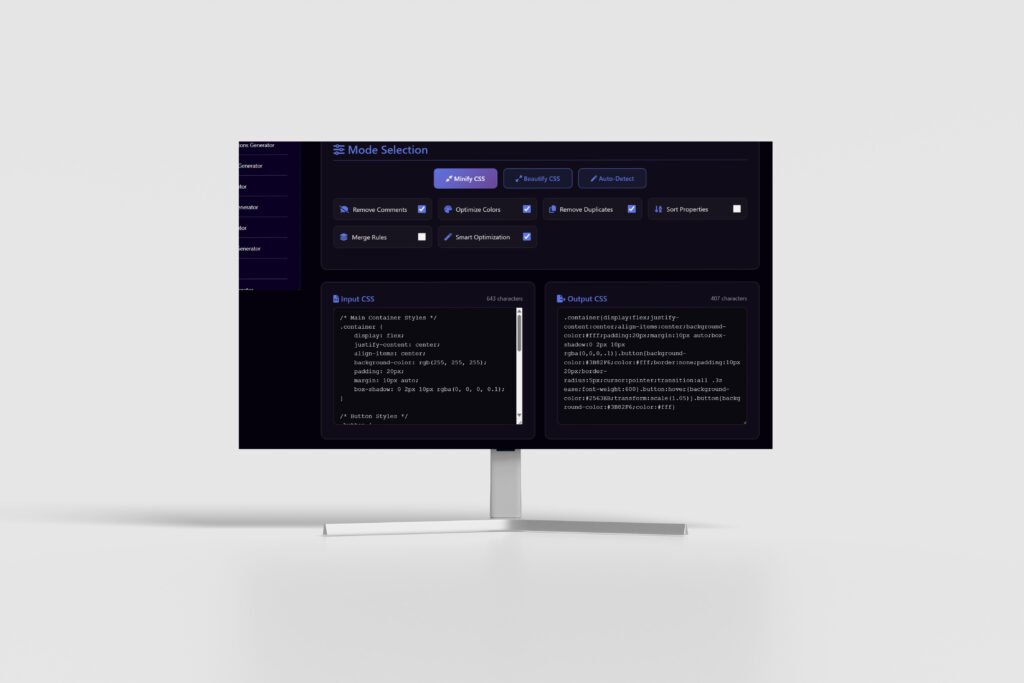
CSS Minifier & Beautifier Pro: Code Optimization
Clean, readable code is essential for maintainability, while minified code improves performance. The KineTools CSS Minifier & Beautifier handles both scenarios intelligently.
Dual Functionality:
- Minification: Removes whitespace, comments, and unnecessary characters to reduce file size
- Beautification: Formats messy CSS with proper indentation and structure
Intelligent Detection: The tool automatically detects whether your input is minified or unformatted and acts accordingly, eliminating the need to choose between modes manually.
Additional Powerful Utilities
KineTools offers many more specialized tools including:
- HTML Minifier: Compress HTML for faster loading
- JSON Formatter: Structure JSON data for debugging
- SVG Code Editor: Live preview and edit vector graphics
- Color Palette Generator: Create harmonious color schemes
- Text Animation Studio: CSS-powered typography effects
- Loading Spinner Generator: Engaging loader animations
- Blob Shape Generator: Organic SVG shapes
- Hover Effect Generator: Interactive UI animations
How KineTools Transforms Developer Workflows
Understanding individual tools is valuable, but the real power of KineTools CSS UI design platform emerges when you see how it transforms entire development workflows. Let’s examine specific scenarios where KineTools makes a dramatic impact.
Rapid Prototyping and Iteration
Traditional design processes involve creating mockups in design software, then spending hours translating those designs into CSS code. With KineTools, developers can prototype directly in code with visual tools. Need to show a client three different glassmorphism variations? Create all three in under two minutes and generate the code for whichever option they prefer.
Time Comparison:
- Traditional workflow: Design mockup (20 min) + CSS coding (40 min) + refinements (15 min) = 75 minutes per variation
- KineTools workflow: Visual generation (2 min) + code export (10 sec) = 2 minutes per variation
That’s a 97% time reduction for visual effect implementation.
Consistent Team Output
When development teams use KineTools as their standard toolkit, every team member generates consistent, high-quality code. Junior developers produce professional-level visual effects without senior developer oversight. Design specifications become implementation recipes: “Use preset #3 from the Glassmorphism Generator with 12px blur.”
Education and Learning
Students and bootcamp learners often struggle with complex CSS properties like backdrop-filter, transform-style, and perspective. KineTools serves as both a learning tool and production resource. By adjusting visual controls and observing the generated CSS, developers build intuitive understanding of how CSS properties interact.
Also Read: Google December 2025 Core Update Rollout is Now Complete:
Client Presentations and Approvals
Nothing accelerates client approvals like real-time customization. During video calls, designers can adjust gradients, shadows, and effects while the client watches, getting instant feedback and approval. No more back-and-forth email threads with static mockups—just interactive, collaborative design sessions.
Freelancer Efficiency Multiplier
Freelancers who bill by the hour or project benefit enormously from KineTools. Complete glassmorphism implementations 60x faster, gradient creation in seconds instead of minutes, and shadow effects that once took 15 minutes now take 30 seconds. Take on more clients without working longer hours, or increase profitability by completing projects faster while charging the same rates.
Case Study: Marcus, Freelance Web Developer
Challenge: Marcus handled 8-10 client projects monthly, each involving extensive CSS work, gradient creation, asset optimization, and code formatting before deployment. Context switching between multiple tools consumed 2+ hours daily.
Solution: Marcus standardized his workflow around KineTools, using the gradient generator, glassmorphism tools, CSS beautifier, and shadow generator for every project.
Results:
- Reduced design-to-code time by 65%
- Completed 12-15 projects monthly (50% increase)
- Increased monthly revenue by 40% without working additional hours
- Client satisfaction scores improved due to faster delivery
Development Team Integration
Scenario: A 12-person development agency struggled with inconsistent CSS output. Junior developers produced code that required extensive senior review and refactoring.
Implementation: The agency adopted KineTools as their official CSS generation standard. All developers used the same tools with identical functionality.
Impact:
- 40-50% faster onboarding for new developers
- Consistent code quality across experience levels
- Code review time reduced by 30%
- Design iteration speed increased significantly
SEO and Performance Benefits of KineTools-Generated Code
Beyond development efficiency, KineTools CSS UI design tools produce code that enhances website performance—a critical factor for search engine rankings and user experience.
Optimized Code Output
KineTools generators create clean, efficient CSS without unnecessary declarations or bloated code. Minified output further reduces file sizes, resulting in faster page loads and better Core Web Vitals scores.
Image-Free Visual Effects
Many KineTools tools (gradients, patterns, noise textures) create visual effects with pure CSS instead of image files. This approach:
- Reduces HTTP requests
- Decreases total page weight
- Improves mobile performance
- Scales infinitely without quality loss
- Eliminates image optimization workflows
Modern CSS Standards
All generated code follows current CSS best practices and includes appropriate browser prefixes. This ensures maximum compatibility while leveraging modern CSS capabilities for optimal performance.
KineTools vs. Traditional Design Workflows: A Detailed Comparison
Let’s examine how KineTools stacks up against traditional approaches across key metrics.
Time Efficiency
Traditional Workflow:
- Open design software (1 min)
- Create visual effect (15-30 min)
- Export/screenshot mockup (2 min)
- Write CSS manually (20-40 min)
- Test in browser (5-10 min)
- Refine and iterate (10-20 min) Total: 53-103 minutes per component
KineTools Workflow:
- Open browser tool (5 sec)
- Adjust visual controls (1-2 min)
- Copy generated code (5 sec)
- Paste into project (10 sec) Total: 2-3 minutes per component
Time Savings: 95-98% reduction in design-to-code time
Cost Comparison
Traditional Setup:
- Design software subscriptions: $50-100/month
- Code editor plugins: $20-50/month
- Asset management tools: $15-30/month
- Optimization utilities: $10-20/month Total: $95-200/month
KineTools:
- No subscriptions
- No licenses
- No installations
- No hidden costs Total: $0/month
Annual Savings: $1,140-2,400
Learning Curve
Traditional Tools:
- Design software: 20-40 hours
- Advanced CSS: 50-100 hours
- Tool configuration: 5-10 hours Total: 75-150 hours
KineTools:
- Intuitive interfaces: 5-15 minutes per tool
- No prerequisites required
- Visual learning through experimentation Total: 2-5 hours to master entire platform
Advanced Techniques: Combining Multiple KineTools for Complex Designs
The true power of KineTools emerges when you layer outputs from multiple tools to create sophisticated, multi-dimensional designs.
Layered Background Technique
- Base Layer: Start with the Gradient Generator to create a vibrant color transition
- Texture Layer: Add CSS noise texture at 15-20% opacity for depth
- Pattern Layer: Apply a subtle geometric pattern from the Pattern Generator
- Final Touch: Add glassmorphism cards on top with perfect shadows
Result: A rich, textured background that would traditionally require multiple image files and complex compositing now exists as pure, lightweight CSS.
Interactive Card Design System
- Shadow Foundation: Use Shadow Generator to create base elevation
- Glass Effects: Apply glassmorphism for modern aesthetic
- Hover States: Add custom hover effects with Hover Effect Generator
- Motion Details: Implement tilt effects on images inside cards
Outcome: A complete, interactive card component system with production-ready code in under 10 minutes.
Complete Landing Page Workflow
- Hero section gradient background (Gradient Generator)
- Glassmorphic navigation bar (Glassmorphism Generator)
- Patterned feature section backgrounds (Pattern Generator)
- Interactive product cards with tilting images (Tilt Generator)
- Custom cursors for interactive elements (Cursor Generator)
- Final code optimization (CSS Minifier)
Total Time: 30-45 minutes for complete visual implementation Traditional Time: 6-8 hours of CSS coding
Browser Compatibility and Performance Considerations
KineTools generates code that balances modern CSS capabilities with broad browser support.
Browser Support
All KineTools-generated code works across:
- Chrome (latest 2 versions)
- Firefox (latest 2 versions)
- Safari (latest 2 versions)
- Edge (Chromium-based)
- Opera (latest version)
Mobile Responsiveness
Every tool produces responsive code that adapts beautifully to any screen size. Developers can test effects on mobile devices immediately since KineTools itself is fully responsive.
Performance Optimization
Generated effects maintain smooth 60fps performance through:
- Hardware-accelerated CSS properties (transform, opacity)
- Optimized animation timing functions
- Efficient backdrop-filter implementations
- Minimal DOM impact
Common Challenges Solved by KineTools CSS UI Design Tools
Challenge 1: CSS Property Syntax Complexity
Problem: Remembering exact syntax for properties like box-shadow, background: linear-gradient(), or backdrop-filter is difficult.
Solution: KineTools eliminates the need to memorize syntax. Visual controls generate perfect CSS automatically.
Challenge 2: Trial-and-Error Design Process
Problem: Traditional CSS development involves guessing values, refreshing browsers, and iterating blindly.
Solution: Real-time previews show exactly how changes affect design instantly, eliminating the guess-and-check cycle.
Challenge 3: Cross-Browser Compatibility
Problem: Different browsers require different vendor prefixes and fallback properties.
Solution: KineTools automatically includes necessary browser prefixes in generated code.
Challenge 4: Code Inconsistency Across Teams
Problem: Different developers write CSS differently, leading to maintenance challenges.
Solution: When teams standardize on KineTools, everyone generates consistent, high-quality code.
Challenge 5: Design-to-Development Handoff
Problem: Designers create mockups that developers must interpret and implement.
Solution: Designers and developers can use KineTools together, eliminating interpretation errors and miscommunication.
Getting Started with KineTools: A Step-by-Step Guide
Ready to transform your CSS workflow? Here’s how to get started with KineTools today.
Step 1: Visit the Platform
Navigate to kinetools.com in any modern browser. No registration, no download, no setup required. You’re immediately ready to create.
Step 2: Explore the Tool Library
Browse the collection of 20+ tools. Each tool page includes clear descriptions, real-time previews, and intuitive controls. Start with the most relevant tools for your current project.
Step 3: Generate Your First Effect
Let’s create a gradient:
- Click on “CSS Gradient Generator”
- Select gradient type (linear, radial, or conic)
- Choose colors using the visual color picker
- Adjust angle, stops, and positions
- Watch the real-time preview update
- Click “Copy CSS” when satisfied
- Paste into your project
Time elapsed: 60-90 seconds
Step 4: Bookmark Your Favorites
Create browser bookmarks for the tools you use most frequently. This eliminates even the minimal navigation time on the main site.
Step 5: Integrate into Your Workflow
Identify the points in your development process where KineTools tools provide maximum value:
- During initial design exploration
- When implementing design mockups
- During client presentations
- When optimizing code before deployment
- When teaching junior developers
If KineTools saves you time, it’ll save your team time. Share the platform with colleagues, design teams, and developer partners. Consider making it part of your official development standards.
Future-Proofing Your Skills: Why Learning KineTools Matters
Web development evolves rapidly, but the core principles behind KineTools remain constant: efficiency, quality, and consistency.
Emerging CSS Capabilities
As new CSS properties gain browser support, KineTools updates its generators to incorporate cutting-edge capabilities. Users automatically access new features without updating software or learning new workflows.
Industry Standards Evolution
Modern web development increasingly favors:
- Utility-first approaches (Tailwind CSS support)
- Component-based architecture
- Design systems and consistency
- Performance optimization
KineTools aligns perfectly with these trends, making it a future-proof addition to any developer’s toolkit.
AI and Automation Trends
While AI coding assistants are becoming common, they still struggle with visual CSS effects. KineTools fills this gap perfectly—it’s faster and more accurate than describing effects to AI, with immediate visual feedback that AI cannot provide.
Conclusion: Transform Your CSS Workflow Today
The modern web development landscape demands speed without sacrificing quality. Traditional workflows involving multiple applications, manual CSS coding, and endless iteration cycles simply cannot keep pace with project demands and client expectations.
KineTools CSS UI design platform solves this fundamental challenge by providing 20+ browser-based utilities that eliminate context switching, accelerate design-to-code workflows, and produce production-ready CSS in seconds rather than hours.
From gradients and glassmorphism to shadows, patterns, and interactive effects, KineTools covers every aspect of modern CSS and UI design. The platform’s commitment to privacy through local processing, combined with zero-cost access and no learning curve, makes it the ideal solution for developers, designers, freelancers, agencies, and students alike.
Key Takeaways
- Time Savings: 95-98% reduction in design-to-code time for visual effects
- Cost Efficiency: $0 monthly cost vs. $95-200 for traditional tool subscriptions
- Code Quality: Production-ready CSS with browser prefixes and optimizations
- Privacy First: Local browser processing ensures complete data security
- Zero Barrier: No downloads, installations, sign-ups, or learning curve
- Comprehensive: 20+ tools covering every CSS and UI design need
Your Next Steps
Don’t let inefficient workflows hold back your creative potential. Visit kinetools.com today and experience the difference that purpose-built, privacy-focused, lightning-fast design utilities make in your daily development process.
Generate your first gradient, create a glassmorphism effect, design perfect shadows, or experiment with any of the 20+ available tools. Within minutes, you’ll understand why developers worldwide have made KineTools their essential toolkit for modern CSS and UI design.
The question isn’t whether you can afford to optimize your workflow. The question is whether you can afford not to. Start saving 6-12 hours per week today. Your future self will thank you.
Transform your CSS workflow with KineTools—where efficiency meets excellence.
Subscribe for Newsletter

