

 By
ByIntroduction to Google Antigravity
Google Antigravity represents a paradigm shift in how developers approach software development. Launched on November 18, 2025, alongside the release of Gemini 3, Google Antigravity is not just another code editor—it’s a complete reimagining of the development experience from an agent-first perspective.
Unlike traditional IDEs that simply provide code completion or chatbot interfaces, Google Antigravity enables autonomous AI agents to plan, execute, and verify complex coding tasks across your editor, terminal, and browser. This comprehensive guide explores everything you need to know about this groundbreaking platform that’s changing the landscape of software developement.
What is Google Antigravity?
Google Antigravity is an AI-powered integrated development environment (IDE) specifically designed for agentic software development. Built as a fork of Visual Studio Code, this platform enables developers to delegate complex coding tasks to autonomous AI agents powered primarily by Google’s Gemini 3 Pro model.
The platform introduces a fundamentally different approach to coding. Rather than writing every line yourself, you describe what you want to build at a task-oriented level, and AI agents handle the implementation details. This allows developers to operate more like architects or project managers, orchestrating a workforce of digital agents rather than manually coding every function.
Google Antigravity supports multiple AI models beyond Gemini, including Anthropic’s Claude Sonnet 4.5 and Opus 4.5, as well as open-source variants of OpenAI models. The platform is available free of charge during its public preview period for Windows, macOS, and Linux operating systems.
The Core Philosophy Behind Google Antigravity
Google Antigravity is built on the principle that AI agents shouldn’t just be chatbots sitting in a sidebar—they should have their own dedicated workspace to autonomously execute tasks. The platform embodies what Google calls an “agent-first” development experience.
This agent-first philosophy means that the AI is not merely a tool for autocompleting code snippets. Instead, it functions as an autonomous actor capable of planning, executing, validating, and iterating on complex engineering tasks with minimal human intervention. Your role as a developer shifts from writing individual lines of code to becoming an architect who defines requirements and oversees execution.
The name “Antigravity” itself is metaphorical—it represents lifting the heavy burden of routine coding tasks off developers’ shoulders, allowing them to focus on higher-level problem-solving and creative architecture.
Key Features of Google Antigravity
Google Antigravity comes packed with revolutionary features that distinguish it from traditional development tools:
Autonomous AI Agents
The core feature of Google Antigravity is its autonomous agent system. These AI agents can independently plan multi-step workflows, execute coding tasks, run tests, and validate their own work without constant human supervision. When you give an agent a task, it breaks down the objective into subtasks, executes them sequentially, and verifies the results.
Dual-View Interface
Google Antigravity provides two distinct ways to interact with your code:
Editor View: When you need hands-on control, you work in a state-of-the-art, AI-powered IDE equipped with intelligent tab completions and inline commands. This view supports the synchronous workflow developers already know and love.
Manager View (Mission Control): This is where agent orchestration happens. You can dispatch multiple agents to work on different tasks simultaneously, monitor their progress, and manage complex workflows from a centralized dashboard. This view effectively multiplies your development throughput.
Terminal and Browser Access
Unlike other AI coding assistants, Google Antigravity agents have direct access to your terminal and web browser. This enables them to:
- Execute shell commands and scripts
- Install dependencies and packages
- Run tests and build processes
- Launch browsers for UI testing
- Interact with web applications
- Verify functionality across different environments
Self-Validation and Testing
One of Google Antigravity’s most impressive capabilities is autonomous testing. Browser subagents can launch Chrome, interact with your application’s user interface, and verify functionality automatically. The platform includes advanced verification workflows that ensure code quality, security, and performance standards are met before presenting results to you.
Multi-Agent Management
Google Antigravity allows you to run multiple AI agents simultaneously, each working on different projects or aspects of the same project. Imagine dispatching five different agents to fix five different bugs at the same time—this is the kind of parallelization that Google Antigravity makes possible.
Workflow and Rules System
The platform includes a sophisticated workflow system that allows you to define reusable patterns and rules. For example, you can create a “generate-unit-tests” workflow that automatically generates comprehensive test coverage for any module in your codebase.
Model Flexibility
While Google Antigravity is optimized for Gemini 3 Pro, it supports multiple AI models, giving developers the flexibility to choose the right model for specific tasks. The platform includes generous rate limits for Gemini 3 Pro usage during the public preview period.
How Google Antigravity Works: The Technical Architecture
Understanding how Google Antigravity operates reveals the impressive engineering behind this platform.
Agent Intelligence Layer
At the heart of Google Antigravity lies the Gemini 3 Pro model, which scores an impressive 54.2% on Terminal-Bench 2.0—a benchmark that tests a model’s ability to operate computers via terminal. This advanced reasoning capability enables agents to understand complex instructions, break them into executable steps, and adapt when encountering obstacles.
Direct System Integration
Google Antigravity agents don’t just suggest code—they have direct access to your development environment’s core systems:
- Editor Control: Agents can create, modify, and delete files across your entire workspace
- Terminal Execution: Agents run commands, manage processes, and handle compilation
- Browser Automation: Agents control web browsers for testing and validation
This deep integration allows agents to work truly autonomously rather than requiring constant human intervention.
Security Architecture
Giving AI agents system access raises legitimate security concerns. Google Antigravity addresses this through a granular permission system:
Terminal Command Auto Execution Policies: You configure whether agents can execute commands automatically, must ask for approval, or are restricted from certain operations.
Allow Lists and Deny Lists: You define which commands and operations agents can perform and which are strictly prohibited.
Browser Allow Lists: You control which websites and domains agents can access during browser-based tasks.
These security controls ensure that agent autonomy doesn’t compromise system safety.
Learning and Adaptation
Google Antigravity agents learn from your feedback and past work, improving their understanding of your coding style, project conventions, and preferences over time. This personalization makes agents increasingly effective as you use the platform.
Setting Up Google Antigravity: Step-by-Step Guide
Getting started with Google Antigravity is straightforward. Here’s a comprehensive setup guide:
System Requirements
Before installation, ensure your system meets these requirements:
- Operating System: macOS, Windows, or supported Linux distributions
- RAM: 8GB minimum, 16GB recommended for optimal performance
- Account: Personal Gmail account for authentication
- Internet Connection: Required for AI model access
Installation Process
Step 1: Download Google Antigravity
Navigate to antigravity.google/download and select the appropriate version for your operating system. The platform is currently available in public preview and completely free for individual developers.
Step 2: Install the Application
Run the installer package for your platform:
- macOS: Open the .dmg file and drag Antigravity to your Applications folder
- Windows: Run the .exe installer and follow the setup wizard
- Linux: Follow the distribution-specific installation instructions provided
Step 3: Launch and Authenticate
Open Google Antigravity and sign in with your personal Gmail account. The platform will authenticate and provision your free API quota for Gemini 3 Pro access.
Step 4: Configure Security Settings
On first launch, you’ll configure your Terminal Command Auto Execution policy. Choose from:
- Automatic Execution: Agents run commands without asking (fastest but least secure)
- Approval Required: You review and approve commands before execution (recommended)
- Restricted Mode: Limited command execution for maximum security
Step 5: Open Your First Workspace
Click “Open Workspace” and select a folder containing your project. Google Antigravity will index your codebase and prepare agents to assist with development.
Initial Configuration Tips
- Set up Allow Lists and Deny Lists based on your security requirements
- Configure browser access permissions for UI testing
- Review and customize agent workflows for common tasks
- Familiarize yourself with both Editor View and Manager View interfaces
Google Antigravity vs. Traditional AI Coding Tools
How does Google Antigravity compare to established AI coding assistants? Here’s a detailed comparison:
Google Antigravity vs. GitHub Copilot
GitHub Copilot excels at code completion and suggestion within your existing workflow. It’s like having an intelligent autocomplete that predicts what you’ll type next.
Google Antigravity goes far beyond autocomplete. It can autonomously plan, execute, and verify entire features while you work on other tasks. While Copilot assists with writing code faster, Antigravity can build complete functionalities independently.
Key Differences:
- Autonomous planning: Antigravity ✓, Copilot ✗
- Terminal access: Antigravity ✓, Copilot ✗
- Browser automation: Antigravity ✓, Copilot ✗
- Multi-agent management: Antigravity ✓, Copilot ✗
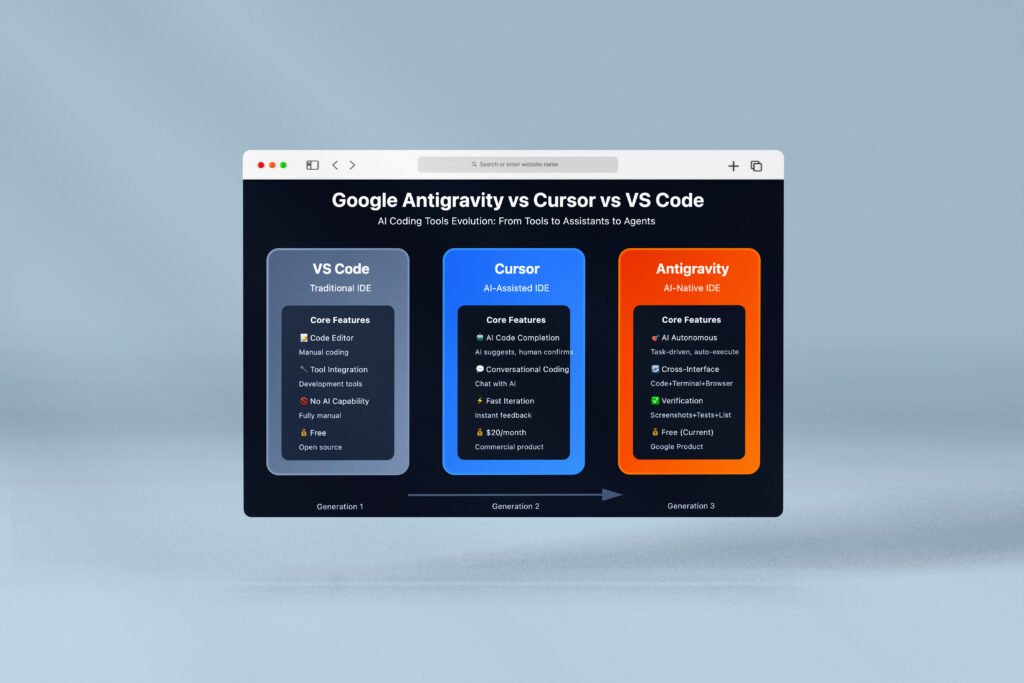
Google Antigravity vs. Cursor
Cursor is an AI-first code editor that provides excellent inline suggestions and conversational coding assistance. It’s built for interactive development with AI.
Google Antigravity shares Cursor’s AI-first philosophy but adds autonomous agent capabilities. While both offer code completion, only Antigravity provides dedicated agent workspaces where multiple AI assistants can work independently on different tasks.
Key Differences:
- Agent autonomy: Antigravity’s agents can work unsupervised for extended periods
- Browser testing: Antigravity includes automated UI validation
- Multi-agent orchestration: Antigravity allows parallel agent workflows
- System access depth: Antigravity provides more comprehensive terminal and browser control
The Antigravity Advantage
What truly sets Google Antigravity apart is its agent-first architecture. Traditional tools augment your coding; Antigravity can replace significant portions of routine development work through autonomous agents. This represents a fundamental shift from AI assistance to AI autonomy.
Real-World Use Cases for Google Antigravity
Google Antigravity shines in numerous development scenarios. Here are practical applications:
Automated Testing and Quality Assurance
Create a workflow that automatically generates comprehensive unit tests for your entire codebase. Agents analyze your functions, identify edge cases, and write thorough test coverage—all without manual intervention.
Example workflow: /generate-unit-tests command analyzes your Python modules and produces test_*.py files with complete test suites for every function.
Also Read: Create Beautiful Loading Spinners With Just Few Clicks
Web Scraping and Data Collection
Dispatch an agent to visit external websites, extract specific information, and return structured data. The agent controls a browser, navigates pages, handles authentication, and compiles results.
Example task: “Visit TechCrunch, find the latest AI news articles, extract titles and summaries, and save them to a JSON file.”
Full-Stack Application Development
Describe a web application you want to build, and agents handle the entire implementation—from backend APIs to frontend interfaces. Agents create project structure, implement features, write tests, and provide comprehensive documentation.
Example task: “Build a todo list application with React frontend, Node.js backend, and PostgreSQL database. Include user authentication.”
Bug Fixing and Debugging
Instead of manually debugging issues, describe the bug to an agent and let it investigate. Agents examine code, reproduce errors in the terminal, identify root causes, implement fixes, and verify solutions.
Example task: “Fix the authentication error in the login module where tokens expire prematurely.”
Documentation Generation
Agents analyze your codebase and automatically generate comprehensive documentation including API references, usage examples, and architecture diagrams.
Code Migration and Refactoring
Delegate complex refactoring tasks to agents. They can modernize legacy code, migrate between frameworks, or restructure entire codebases while maintaining functionality.
The Technology Powering Google Antigravity
Google Antigravity leverages cutting-edge AI technology to deliver its capabilities:
Gemini 3 Pro Model
Released alongside Google Antigravity, Gemini 3 Pro is Google’s most advanced AI model optimized for agentic workflows and coding tasks. It demonstrates remarkable reasoning abilities and tool-use capabilities that enable autonomous software development.
Key Gemini 3 Pro capabilities:
- Advanced reasoning for complex problem-solving
- Exceptional tool-use for controlling terminals and browsers
- Multimodal understanding for processing code, documentation, and UI elements
- Long-context windows for understanding large codebases
Terminal-Bench 2.0 Performance
Gemini 3 Pro’s 54.2% score on Terminal-Bench 2.0 represents state-of-the-art performance in computer control via terminal. This benchmark specifically tests models’ abilities to navigate file systems, execute commands, manage processes, and accomplish complex tasks—exactly what Google Antigravity agents need.
Visual Reasoning and UI Testing
Google Antigravity incorporates visual reasoning capabilities that enable browser subagents to understand and interact with user interfaces. Agents can identify buttons, forms, navigation elements, and verify that applications render correctly across different screen sizes.
Continuous Learning Architecture
The platform implements feedback loops where agents learn from successful and unsuccessful attempts. Over time, agents develop better understanding of your specific codebase, architectural patterns, and development preferences.
Security Considerations and Best Practices
While Google Antigravity offers powerful capabilities, responsible usage requires attention to security:
Understanding the Risks
Giving AI agents terminal and browser access creates potential vectors for:
- Prompt Injection: Malicious inputs could trick agents into executing harmful commands
- Data Exfiltration: Agents might inadvertently expose sensitive information
- Unintended Modifications: Autonomous agents could make unwanted changes to critical systems
Implementing Security Best Practices
Use Approval-Required Mode: Especially when starting out, configure agents to request permission before executing terminal commands. This provides oversight without sacrificing too much efficiency.
Configure Robust Deny Lists: Identify potentially dangerous commands (rm -rf, system modifications, network operations) and add them to your Deny List to prevent execution.
Implement Browser Restrictions: Limit which domains agents can access. Only allow necessary sites for testing and research.
Review Agent Actions: Regularly audit what agents have done in your workspace. Google Antigravity provides logs and history for this purpose.
Separate Development Environments: Consider using Google Antigravity in isolated development environments rather than on systems with access to production resources.
Keep Sensitive Data Secure: Don’t store API keys, passwords, or confidential data in plaintext files where agents might inadvertently access them.
Google’s Security Measures
Google has implemented multiple safety layers:
- Permission systems with granular controls
- Sandboxing for agent operations
- Monitoring for suspicious activities
- Regular security audits of the platform
The Future of Development with Google Antigravity
Google Antigravity represents just the beginning of agentic software development. Looking ahead, we can anticipate several evolutionary directions:
Enhanced Multi-Agent Collaboration
Future versions may enable agents to communicate with each other, delegate subtasks, and collaborate on complex projects with minimal human coordination.
Vertical Specialization
We might see specialized agent types optimized for specific domains—frontend agents, database agents, DevOps agents—each with deep expertise in particular technologies.
Integration with Development Workflows
Expect tighter integration with version control systems, CI/CD pipelines, project management tools, and collaborative development platforms.
Improved Reasoning and Planning
As underlying AI models advance, agents will handle increasingly sophisticated tasks requiring multi-step reasoning, trade-off evaluation, and creative problem-solving.
Enterprise Features
While currently focused on individual developers, future versions will likely include team collaboration features, organizational controls, and enterprise-grade security.
Google Antigravity in the Broader AI Development Ecosystem
Google Antigravity exists within a rapidly evolving ecosystem of AI development tools:
Complementary Tools
Gemini CLI: Google’s command-line interface for Gemini provides terminal-based AI assistance that complements Antigravity’s GUI.
Google AI Studio: For rapid prototyping and experimentation, AI Studio’s Build mode allows you to generate fully functional apps from single prompts.
Android Studio Integration: Gemini 3 Pro capabilities extend to mobile development through Android Studio integration.
Competitive Landscape
Other companies are exploring similar territory:
- Anthropic’s Claude: Powers many coding assistants with strong reasoning capabilities
- OpenAI’s GPT models: Widely integrated into development tools
- Cursor and Windsurf: AI-first IDEs with growing capabilities
Google’s Strategy
Google Antigravity is part of Google’s broader strategy to lead in AI-powered development tools. The company views this as an “experiment” alongside other initiatives like Gemini CLI and Jules, testing different approaches to AI-assisted coding.
Getting the Most Out of Google Antigravity
To maximize your productivity with Google Antigravity, consider these tips:
Start with Clear, Specific Instructions
Agents perform best when given precise, well-defined tasks. Instead of “improve the code,” try “refactor the authentication module to use JWT tokens instead of session cookies.”
Leverage Workflows for Recurring Tasks
Create custom workflows for tasks you perform frequently. This saves time and ensures consistent execution patterns.
Use Manager View for Parallel Work
When you have multiple independent tasks, dispatch separate agents to work on them simultaneously. While one agent writes tests, another can update documentation, and a third can fix bugs.
Review and Learn from Agent Actions
Study what agents produce. Understanding their approaches helps you write better instructions and teaches you new techniques.
Combine Automation with Human Expertise
Let agents handle routine, well-defined tasks while you focus on architecture, design decisions, and creative problem-solving that requires human judgment.
Iterate and Refine
If an agent’s first attempt isn’t perfect, provide feedback and let it iterate. Agents improve through this refinement process.
Build Gradually
Don’t immediately hand your most critical projects to agents. Start with smaller, lower-risk tasks to build trust and understanding of the platform’s capabilities.
Learning Resources for Google Antigravity
To deepen your understanding of Google Antigravity, explore these resources:
Official Documentation
- Google Developers Blog: Regular updates and announcements about Antigravity
- Google Codelabs: Step-by-step tutorials for getting started
- API Documentation: Comprehensive reference for platform capabilities
Community Resources
- Medium Tutorials: Detailed walkthroughs from community members
- Developer Forums: Community discussions, tips, and troubleshooting
- YouTube Channels: Video tutorials demonstrating Antigravity workflows
Comparison Resources
- The New Stack: In-depth reviews and hands-on analyses
- Developer Blogs: Real-world experiences from early adopters
- Technical Comparisons: Articles comparing Antigravity to other tools
The Cultural Impact of Google Antigravity
Google Antigravity represents more than just a new development tool—it signals a fundamental shift in software engineering:
Redefining the Developer Role
As agents handle more routine implementation work, developers increasingly function as architects, designers, and product managers. This shift elevates the role from code writer to system orchestrator.
Democratizing Software Development
By lowering technical barriers, tools like Google Antigravity may enable more people to bring their ideas to life without years of coding education. “Vibe coding”—describing what you want in natural language—becomes increasingly viable.
Accelerating Innovation
When agents handle implementation details, developers can iterate faster, explore more ideas, and build more ambitious projects. This acceleration could dramatically increase the pace of software innovation.
Raising New Questions
Google Antigravity also raises important questions about code ownership, liability for agent-generated bugs, the future of developer education, and the nature of software craftsmanship in an AI-augmented world.
Conclusion: Embracing the Agentic Development Era
Google Antigravity marks a pivotal moment in software development history. By providing autonomous AI agents with direct access to editors, terminals, and browsers, Google has created a platform that genuinely augments—and sometimes replaces—traditional coding workflows.
The platform’s agent-first architecture represents Google’s vision for the future of development: one where human developers focus on high-level architecture and creative problem-solving while AI agents handle implementation details. This isn’t about replacing developers; it’s about elevating what developers can accomplish.
As Google Antigravity continues evolving during its public preview period, we can expect additional features, improved agent capabilities, and broader integration with the development ecosystem. The platform currently serves as an exciting experiment in how AI and human developers can collaborate most effectively.
Whether you’re a seasoned developer curious about agentic workflows, a team looking to accelerate development velocity, or someone exploring the cutting edge of AI-powered tools, Google Antigravity offers a glimpse into the future of software creation. The barrier to entry is low—the platform is free, easy to install, and designed for developers at all skill levels.
The age of agentic development has arrived with Google Antigravity. The question isn’t whether AI will transform software development—it’s already happening. The question is how quickly developers will adapt to this new paradigm and what amazing things they’ll build with autonomous agents as their collaborators.
Download Google Antigravity today at antigravity.google/download and experience the future of development. Let AI agents handle the implementation while you focus on building the next generation of innovative software. The future of coding is agentic, and it starts with Google Antigravity.
Is Google Antigravity free to use?
Yes, Google Antigravity is completely free during its public preview period. Google provides generous rate limits for Gemini 3 Pro usage at no cost to individual developers. Future pricing models haven’t been announced yet.
What programming languages does Google Antigravity support?
Google Antigravity supports all major programming languages including Python, JavaScript, TypeScript, Java, C++, C#, Go, Rust, Ruby, PHP, Swift, Kotlin, and many more. The underlying AI models are trained on diverse codebases across languages.
Can I use Google Antigravity with my existing projects?
Absolutely. Simply open your existing project folder as a workspace in Google Antigravity. The platform will index your codebase and agents can immediately begin assisting with development.
How does Google Antigravity handle proprietary code?
Your code remains private. Google Antigravity processes code locally on your machine, with only necessary data sent to AI models for processing. Google’s privacy policies govern how data is handled, though you should review these if working with highly sensitive codebases.
What’s the relationship between Google Antigravity and Visual Studio Code?
Google Antigravity is built as a fork of Visual Studio Code, meaning it shares VS Code’s core architecture and many familiar features. However, Antigravity adds significant agent-oriented capabilities not present in standard VS Code.
Is Google Antigravity suitable for beginners?
Google Antigravity can benefit developers at all skill levels. Beginners might find the agent assistance helpful for learning, though understanding fundamental programming concepts remains important. The platform is particularly powerful for experienced developers who can effectively orchestrate agents.
Can I use Claude or GPT models instead of Gemini?
Yes! Google Antigravity supports Anthropic’s Claude Sonnet 4.5 and Opus 4.5, as well as open-source variants of OpenAI models. You can select your preferred model based on task requirements.
Subscribe for Newsletter

