
 By
ByIf you’ve ever spent hours tweaking CSS z-index values, trying to get your UI cards to stack just right, you’re definitely not alone. Creating visually appealing stacked card interfaces is one of those tasks that seems simple in theory but becomes frustratingly complex in practice.
The Z-Index Nightmare Every Developer Faces
Let me paint you a familiar picture: You’re building a beautiful card interface for your website. You want cards to overlap slightly, creating that modern stacked effect that adds depth to your design. So you start adding position properties, z-index values, and transforms. First, you try z-index: 1, then z-index: 10, then suddenly you’re at z-index: 9999 and nothing makes sense anymore.
Sound familiar? This CSS card stack generator problem has plagued developers for years. The z-index property, while powerful, comes with its own set of quirks and stacking contexts that can make even experienced developers pull their hair out.
Why Manual CSS Card Stacking is So Difficult
Before we dive into the solution, let’s understand why creating stacked cards manually is such a challenge:
1. Stacking Context Confusion
The z-index property only works within the same stacking context. When you have nested elements, parent z-index values can completely override child values, leading to unexpected results. You could have an element with z-index: 9999, but if its parent has z-index: 1, it will still appear behind another element with z-index: 2.
2. Position Property Requirements
Many developers forget that z-index only works on positioned elements (position: relative, absolute, fixed, or sticky). Without proper positioning, your z-index values do absolutely nothing, leading to hours of debugging.
3. Transform and Opacity Side Effects
CSS transforms and opacity values create new stacking contexts automatically. This means adding a simple transform: rotate(3deg) to create that tilted card effect can completely change how your z-index values behave across the entire layout.
4. Browser Inconsistencies
Different browsers sometimes handle stacking contexts slightly differently, especially when dealing with complex layouts involving flexbox or grid. What works perfectly in Chrome might look slightly off in Safari or Firefox.
5. Time-Consuming Trial and Error
The biggest issue? Manual CSS card stacking requires constant tweaking and testing. Change one value, refresh the page, adjust another value, refresh again. This process can easily consume hours of development time for what should be a simple visual effect.
Enter the CSS Card Stack Generator Solution
This is where KineTools’ CSS card stack generator transforms your workflow completely. Instead of spending hours manually coding and debugging card stacks, you can create perfect stacked card interfaces in minutes with a visual, intuitive tool that handles all the complex CSS for you.
Also Read: Google Antigravity
What Makes KineTools Different?
KineTools offers a comprehensive suite of free design and developer tools, and their CSS card stack generator stands out for several reasons:
Visual Real-Time Preview: See your card stack design come to life as you adjust parameters. No more guessing how changes will look – you see everything instantly in the preview panel.
Automatic Z-Index Management: The generator intelligently calculates z-index values based on your design choices, ensuring proper stacking order without the need for trial and error or absurdly high numbers like z-index: 99999.
Perfect Positioning: All position properties are automatically set correctly, so you never have to worry about z-index not working because you forgot to add position: relative to an element.
Export-Ready Code: Get clean, production-ready CSS code that you can copy and paste directly into your project. The code is optimized, well-commented, and follows best practices.
No Sign-Up Required: Unlike many design tools that lock features behind paywalls or registration, KineTools gives you full access immediately. Just open your browser and start creating.
How to Use KineTools CSS Card Stack Generator
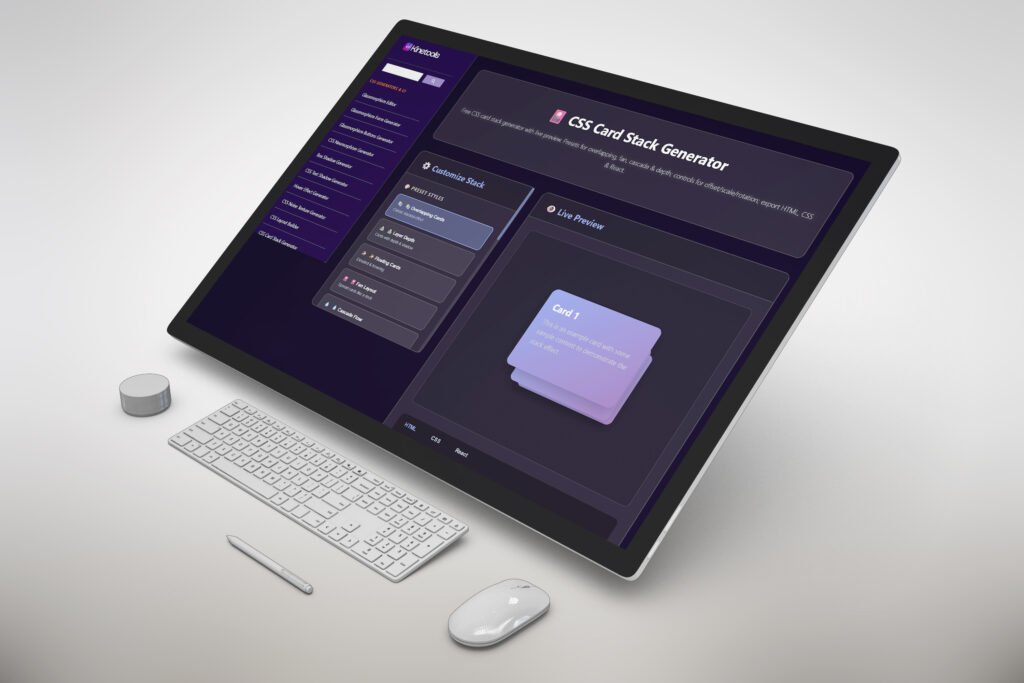
Using the CSS card stack generator on KineTools is incredibly straightforward. Here’s a step-by-step walkthrough:
Step 1: Access the Tool
Navigate to CSS Card Stack Generator in your browser. The tool loads instantly – no downloads, no installations, no account creation needed.
Step 2: Configure Your Card Stack
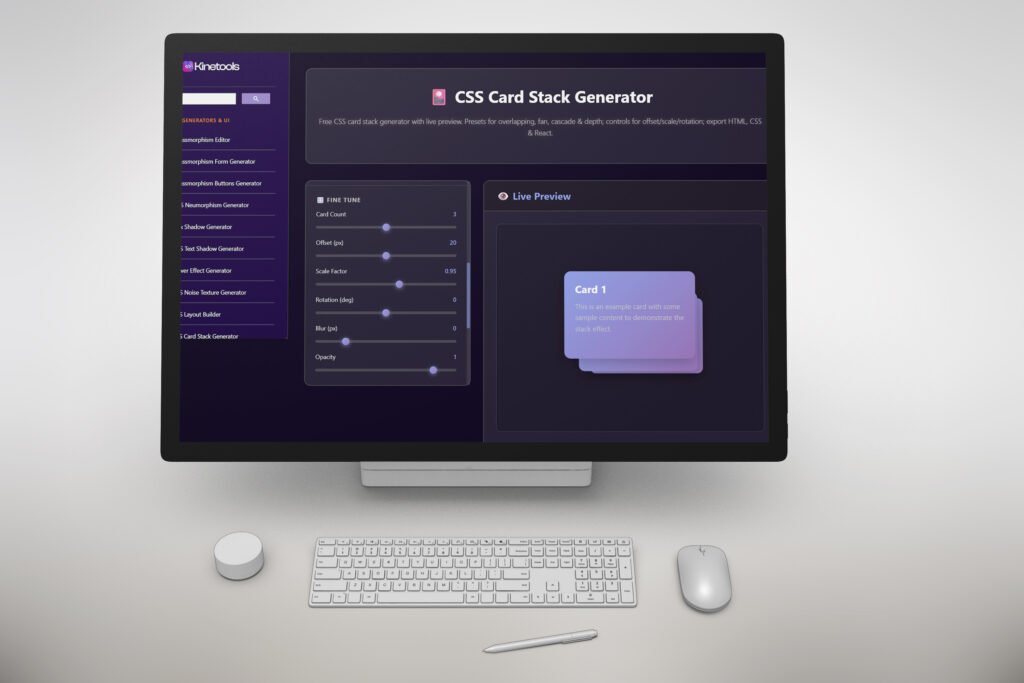
The generator provides intuitive controls to customize every aspect of your card stack:
- Number of Cards: Choose how many cards you want in your stack (typically 3-5 cards work best visually)
- Card Dimensions: Set width and height to match your design requirements
- Spacing: Adjust the offset between cards for that perfect layered look
- Rotation: Add subtle rotation angles to create dynamic, eye-catching effects
- Colors: Customize background colors, borders, and shadows for each card
- Shadow Effects: Apply box shadows to add depth and make cards pop off the page
Step 3: Fine-Tune Your Design
As you adjust parameters, the live preview updates instantly. This real-time feedback lets you experiment freely without consequences. Try different color combinations, adjust spacing, play with rotation angles – see what works best for your specific design.
Step 4: Export Your Code
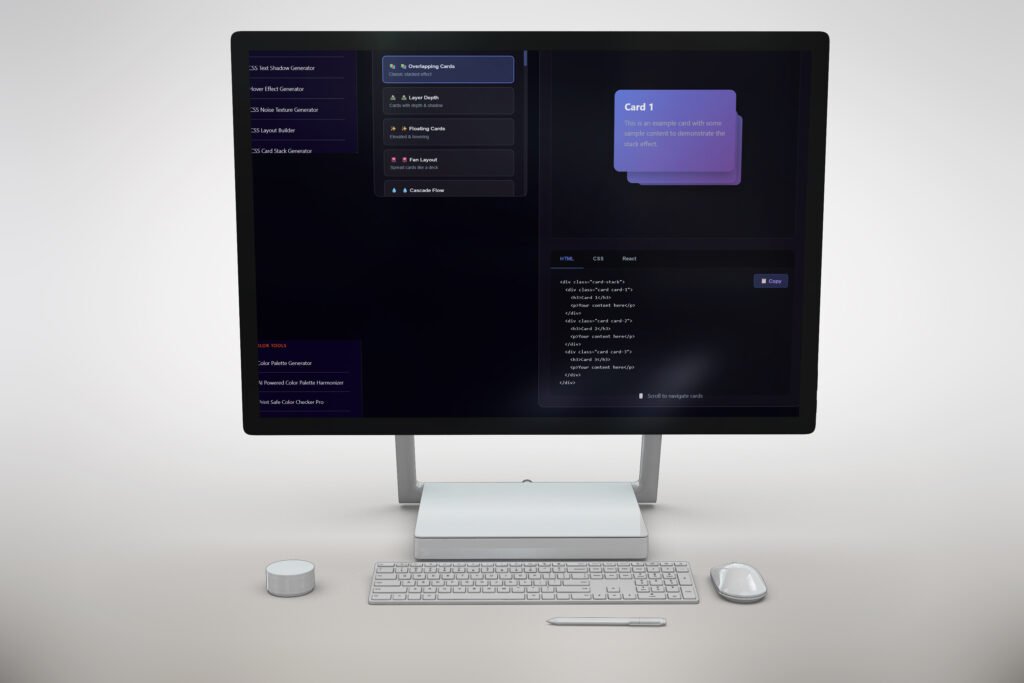
Once you’re satisfied with your design, simply click the export button. KineTools provides your CSS code in multiple formats:
- Standard CSS: Clean, vanilla CSS that works anywhere
- SCSS/SASS: If you’re using preprocessors in your workflow
- Inline Styles: For quick prototyping or component-based frameworks
- Tailwind CSS: Pre-configured utility classes if you’re using Tailwind
The code comes complete with all necessary properties: position, z-index, transform, box-shadow, and everything else needed to recreate your exact design.
Common CSS Card Stack Design Patterns
The CSS card stack generator on KineTools makes it easy to create several popular design patterns:
The Classic Overlap Stack
Cards overlap each other with a slight offset, creating depth through layering. Each card sits partially behind the one in front, with increasing z-index values from back to front. This pattern works perfectly for showcasing testimonials, product features, or portfolio items.
The Tilted Deck
Cards are rotated at subtle angles, mimicking a scattered deck of cards. The CSS card stack generator automatically calculates proper z-index values even when transforms are applied, avoiding the stacking context issues that plague manual implementations.
The Hover Fan Effect
Cards stack neatly when static but fan out on hover, revealing all cards simultaneously. This interactive pattern requires precise z-index management and hover state CSS – both handled automatically by the generator.
The Progressive Stack
Each card is slightly scaled down and positioned further back, creating a perspective effect. Combined with appropriate shadows, this creates a genuine 3D appearance using only CSS.
Advanced Customization Options
While the CSS card stack generator provides instant results, it also offers advanced customization for developers who need more control:
Custom Animation Properties
Add transition effects to make your card stack interactive. The generator can include CSS animations that trigger on hover, click, or scroll events. Define animation duration, easing functions, and delay values all within the tool.
Responsive Breakpoints
Modern websites need to work on all devices. KineTools’ generator can export responsive CSS with media queries, ensuring your card stack looks great on mobile phones, tablets, and desktop screens. The tool automatically adjusts card spacing, rotation, and z-index values at different viewport sizes.
Accessibility Considerations
The exported code includes proper semantic HTML suggestions and accessibility attributes. This ensures your card stacks are usable for people relying on screen readers or keyboard navigation.
Why Z-Index Management Matters for Performance
Proper z-index management isn’t just about getting your cards to stack correctly – it also affects website performance. Here’s why using a CSS card stack generator leads to better-performing websites:
Reduced Browser Repainting
When z-index values are set correctly from the start, browsers can optimize rendering. Excessive or poorly managed z-index values force browsers to recalculate layouts more frequently, especially during animations or scroll events.
Cleaner CSS Files
Manual card stacking often results in bloated CSS with redundant or conflicting z-index declarations. The generator produces lean, efficient code with only the necessary properties, reducing file size and improving load times.
Better Stacking Context Control
Understanding and controlling stacking contexts prevents unnecessary composite layers. This is especially important on mobile devices where GPU resources are limited.
Real-World Use Cases for CSS Card Stacks
CSS card stack generators enable numerous practical design applications:
Portfolio Showcases
Display project thumbnails in an engaging stacked layout. Users can hover or click to expand and view details. The layered appearance immediately communicates depth and professionalism.
Testimonial Sections
Stack client testimonials with photos, creating visual interest while efficiently using space. The cards can cycle automatically or respond to user interaction.
Product Feature Highlights
Present product features as stacked cards, with each card revealing different aspects. The stacking effect naturally guides user attention through information hierarchy.
Image Galleries
Create unique photo galleries where images overlap artistically. This works particularly well for creative portfolios, photography websites, or artistic presentations.
Pricing Tables
Stack pricing tiers with the most popular option prominently positioned in front. The z-index hierarchy visually emphasizes your preferred plan while still showing alternatives.
Progress Indicators
Visualize multi-step processes or timelines using stacked cards, with completed steps fading into the background and current steps prominent in front.
Combining CSS Card Stacks with Other KineTools Features
KineTools offers over 20 free design tools that work beautifully together with the CSS card stack generator:
Add Gradient Backgrounds
Use KineTools’ CSS Gradient Generator to create stunning gradient backgrounds for your cards. The gradient tool supports linear, radial, and conic gradients with unlimited color stops, perfect for creating modern, eye-catching card designs.
Apply Custom Shadows
The Box Shadow Generator creates perfect shadows that add depth to your card stacks. Experiment with multiple shadow layers, blur radii, and opacity values to achieve exactly the look you’re going for.
Create Pattern Overlays
The CSS Background Pattern Generator offers 15+ geometric patterns you can overlay on cards. Combine dots, stripes, zigzags, or hexagons with your card stack for unique visual effects.
Design Glassmorphism Effects
Modern card designs often incorporate glassmorphism – that frosted glass effect with backdrop blur. KineTools’ Glassmorphism Generator integrates seamlessly with card stacks, creating sophisticated, contemporary interfaces.
Animate Your Cards
The Text Animation Studio and other animation tools on KineTools help you add smooth transitions and effects to your card stacks. Create fade-ins, slides, bounces, and more – all exportable as production-ready CSS.
Best Practices for CSS Card Stack Design
When creating card stacks, whether manually or with a CSS card stack generator, keep these design principles in mind:
1. Maintain Visual Hierarchy
The most important card should have the highest z-index and be the most prominent. Use size, color, and positioning to guide user attention appropriately.
2. Keep It Subtle
Overlapping should be noticable but not overwhelming. Typically, cards should overlap by 10-30% of their width or height. Too much overlap makes content hard to read; too little defeats the purpose of stacking.
3. Use Consistent Spacing
Whether you’re offsetting cards by pixels or percentages, maintain consistency. Inconsistent spacing looks amateurish and confuses users.
4. Consider Touch Targets
On mobile devices, ensure stacked cards have adequate touch targets. Cards should be large enough and spaced appropriately for finger taps, not just mouse clicks.
5. Test Across Devices
Always preview your card stacks on actual devices, not just browser dev tools. Real-world testing reveals issues that emulators miss.
6. Optimize for Accessibility
Ensure proper keyboard navigation through stacked cards. Use semantic HTML and ARIA attributes so screen readers can properly convey the stacked card structure.
Troubleshooting Common CSS Card Stack Issues
Even with a CSS card stack generator, you might encounter occasional issues when implementing designs. Here are solutions to common problems:
Cards Not Stacking Correctly
Problem: Cards appear in the wrong order despite z-index values. Solution: Check if parent elements have their own z-index values creating conflicting stacking contexts. The generator’s code isolates card stacks to prevent this, but integration into existing layouts can cause conflicts.
Cards Disappearing on Mobile
Problem: Card stacks look perfect on desktop but break on mobile devices. Solution: Ensure you’re using the responsive code export option. Mobile viewports need adjusted spacing and sometimes simplified layouts.
Hover Effects Not Working
Problem: Interactive hover effects fail to trigger. Solution: Verify that z-index values allow the correct card to receive hover events. Sometimes, transparent cards with higher z-index values intercept mouse events intended for visible cards below.
Performance Issues with Many Cards
Problem: Page becomes sluggish with numerous stacked card groups. Solution: Limit the number of cards per stack (3-5 is optimal) and avoid excessive animations. Consider lazy-loading card stacks that appear below the fold.
The Future of CSS Card Design
CSS continues evolving, and KineTools stays current with the latest standards. Upcoming CSS features that will enhance card stack design include:
CSS Container Queries
Container queries will allow card stacks to respond to their container’s size rather than the viewport. This enables more flexible, component-based designs.
CSS Cascade Layers
The @layer rule provides better control over CSS specificity and stacking contexts, making card layouts more predictable and easier to maintain.
Advanced CSS Functions
New CSS functions like clamp(), min(), and max() enable more responsive card sizing without media queries, creating truly fluid designs.
CSS Scroll Animations
Native scroll-driven animations will make it easier to create card stacks that respond dynamically to user scrolling, all without JavaScript.
Why Choose KineTools Over Other Tools?
When searching for a CSS card stack generator, you’ll find various options. Here’s why KineTools stands out:
Completely Free
No freemium model, no hidden costs, no feature limitations. Every tool on KineTools is 100% free to use, with full functionality available immediately.
Privacy-Focused
All tools run locally in your browser. Your designs, code, and data never touch KineTools servers, ensuring complete privacy and security.
No Learning Curve
The interface is intuitive enough for beginners yet powerful enough for professionals. No tutorials required – just start creating.
Regular Updates
KineTools consistently adds new features and improvements based on user feedback and emerging web design trends.
Comprehensive Tool Ecosystem
Beyond the CSS card stack generator, KineTools offers 20+ complementary tools that work together seamlessly, streamlining your entire design workflow.
Export Flexibility
Unlike tools that lock you into proprietary formats, KineTools exports standard CSS that works anywhere. You own your code completely.

Conclusion: Stop Guessing, Start Creating
Manual CSS card stacking with trial-and-error z-index values belongs in the past. Modern developers need modern tools that respect their time and expertise.
KineTools’ CSS card stack generator eliminates the frustration of positioning, z-index management, and stacking context debugging. Whether you’re building a portfolio, designing a landing page, or creating an interactive web application, the tool provides a fast, reliable way to create professional card stack interfaces.
The best part? You can start using it right now, completely free, with no signup required. Visit Kinetools and discover how quickly you can transform your card design workflow.
Stop spending hours debugging z-index issues. Stop guessing which values will work. Start creating beautiful, production-ready card stacks in minutes with KineTools.
Is the CSS card stack generator really free?
Yes, absolutely. KineTools provides full access to all features without any cost, registration, or time limits.
Can I use the generated code in commercial projects?
Definitely. The CSS code you generate is yours to use however you want, including in commercial projects, client work, or products.
Does it work on mobile devices?
Yes, the generator itself works on any device with a modern browser, and it can export responsive code optimized for mobile viewports.
Do I need coding experience to use the CSS card stack generator?
No coding experience necessary. The visual interface makes it easy for anyone to create card stacks, though understanding basic CSS helps with customization.
Subscribe for Newsletter

